Marketers’ Checklist for Privacy Compliant Video Hosting & Shortlist
The practical choice comes down to two routes: a privacy-first vendor that offers a BAA, signed short-lived URLs, encryption, watermarking, and audit logs, or a self-hosted deployment that keeps everything inside your own infrastructure. Whichever route you pick, treat those five controls as non-negotiable, not nice-to-haves. A shortlist of vendors and a procurement checklist follow so you can move from evaluation to a signed contract.
TL;DR:
- Privacy-focused vendors differ in their leak prevention features, with some providing forensic watermarking and short-lived tokens for traceability and others offering comprehensive audit trails and expiring links.
- Signed URL tokens must be tested to ensure they truly expire, as a working expired link indicates a security flaw that could be exploited in real incidents.
- Vendor procurement should include strict contractual requirements such as signed BAAs or DPAs, subprocessor transparency, and technical controls like domain whitelisting and SSO, alongside operational proof like SOC 2 reports.
- Internal processes, such as validating token expiry and reviewing subprocessors regularly, are crucial to maintaining security beyond the vendor’s technical controls.
- Data residency matters; storing videos in regions aligned with legal obligations is essential, especially for healthcare or EU data, and self-hosted solutions offer maximum control if legal requirements demand full infrastructure control.
Table of Contents
- Which Privacy-First Video Hosting Vendors Should You Shortlist?
- What Do Signed URLs, Watermarks, and Audit Logs Actually Do?
- What Should Be on Your Vendor Procurement Checklist?
- How Do You Set Up Secure Video Embeds Step by Step?
- Aligning Marketing, Security, and Legal Around Testimonial Video
- Where Should Your Video Data Actually Live?
- Who Actually Touches Your Video Data Behind the Scenes?
- What Happens When Something Goes Wrong?
- The Vendor Shortlist Only Solves Half the Problem
- A Secure Home for Your Testimonial Videos Starts With Verification
- Sources
- FAQ
Which Privacy-First Video Hosting Vendors Should You Shortlist?
Not every “secure” video platform means the same thing by that word. Some are built for developers who need forensic proof of a leak. Others exist to keep a hospital’s compliance officer calm. Here’s how five privacy-focused vendors actually differ once you look past the marketing page.
- VidEncrypt is built for teams that need traceable leak protection. It uses signed URLs (HMAC-SHA256 tokens), forensic watermarking, and OS-level capture blocking, plus short-lived tokens that expire fast enough to make screen recording and link sharing far less useful to a leaker, according to VidEncrypt’s own security documentation.
- VIDIZMO targets legal, clinical, and enterprise workflows that need more than a locked door. It layers per-recipient expiring links, AI-driven redaction, and full audit trails on top of standard access controls, positioning itself as a secure media exchange rather than a general hosting tool, per VIDIZMO’s secure sharing documentation.
- SproutVideo fits marketing and external review workflows where you still need real access control. Domain whitelisting, signed embeds, SSO, and dynamic watermarking make it a strong fit when sales or legal teams need to share videos outside company walls without losing track of who watched what, based on SproutVideo’s security page.
- SecureVideo is built specifically for clinical telehealth. It advertises HIPAA-focused features including BAA availability, audit logging, intrusion prevention, and multifactor authentication, aimed squarely at healthcare providers who need documentation ready for an audit, not just a claim of compliance, according to SecureVideo’s platform page.
- Ollasync answers a different question entirely: what if the vendor should never see your plaintext video at all? Its self-hostable, server-blind design with end-to-end encryption suits organizations bound by policy or law to keep media inside a controlled jurisdiction, as described on Ollasync’s product page.
Beyond these five, the broader market includes Vimeo, Cincopa, Vidyard, Brightcove, Dacast, Wistia, Kaltura, VideoManager Pro from movingimage, Swarmify, Panopto, and Jetpack’s WordPress video hosting. Most of these serve general business video hosting well, but they vary widely on whether they publish a BAA, support signed tokens, or offer self-hosted deployment. Ask directly rather than assume.
What Do Signed URLs, Watermarks, and Audit Logs Actually Do?
Vendor security pages love to list features. Fewer explain what those features prevent. Here’s the practical function of each control you’ll see quoted in a sales call.
- Signed, short-lived URLs and tokenized playback stop a link from being copied, reused, or embedded somewhere you never approved. A token that expires in minutes rather than days means a leaked link goes stale fast.
- Encryption in transit and at rest (TLS 1.3 in transit, AES-256 stored) is the baseline, not the differentiator. If a vendor can’t confirm both, that’s a disqualifying answer, not a follow-up question.
- Dynamic or forensic watermarking embeds session and viewer identity data directly into the video frame. This does not stop someone from recording their screen, but it makes the recording traceable back to exactly who watched it, which is often a stronger deterrent than blocking the action outright.
- Per-recipient access, view limits, and expiring links shrink the blast radius. Instead of one shareable link for a whole audience, each recipient gets their own token, so revoking access for one person doesn’t affect anyone else.
- Audit logging and evidence trails turn “we think it’s secure” into “here’s who accessed what, when.” For HIPAA response or a compliance audit, this is often the single record that matters most.
Pro Tip: Don’t take a vendor’s word on token expiry. During onboarding, generate a signed URL, let the token expire, then try to reproduce the playback request. If the expired token still works, you’ve found a real problem before it became a real incident.
Identity theft and cybercrime losses keep climbing, and industry loss data compiled by the Insurance Information Institute makes clear why loose video sharing is not a low-stakes gamble. A leaked customer testimonial video with visible personal details is a smaller version of the same exposure.
What Should Be on Your Vendor Procurement Checklist?
Contracts protect you long after the sales call ends. Before signing anything, get these items in writing.
Contract terms to require:
- A signed Business Associate Agreement if any video touches protected health information
- A Data Processing Agreement for any video involving EU resident data
- A published, current list of subprocessors, not a vague “trusted partners” line
- Clear deletion and export terms, including how fast data leaves the vendor’s systems on request
Operational proof to request:
- SOC 2 or ISO 27001 reports, not just a badge on the homepage
- Recent penetration test summaries
- A sample audit log so you can see exactly what gets recorded
Technical must-haves:
- Signed URL tokens with short expiry
- Domain whitelisting
- SSO and SCIM support for user provisioning
- Dynamic watermarking and functioning audit logs
Red flags that should stop the process outright: no BAA or DPA offered when your use case clearly needs one, no audit trail at all, third-party trackers loaded inside the embed code, a subprocessors list the vendor won’t share, or any inability to export or delete your data on demand.
How Do You Set Up Secure Video Embeds Step by Step?
Getting the contract right is half the work, and for marketing teams considering programmatic video ad creation, using AI URL to Video tools can streamline publisher-side embedding and integration efforts. The other half is how your engineering team actually wires it up.
- Issue playback tokens from your backend only, after the viewer authenticates. Never generate tokens client-side, where they’re trivial to intercept.
- Whitelist the domains allowed to embed the video and enforce referer checks. Keep token time-to-live under a minute where the platform allows it.
- Turn on dynamic watermarking for any session involving a reviewer, prospect, or external party, and disable download options unless someone explicitly needs them.
- Build a redaction workflow so you can create a shareable, redacted copy while the original stays untouched and access-controlled.
- Run an onboarding test that reproduces real user access, then pull the resulting audit log to confirm it actually captured what happened.
Pro Tip: Treat the first 30 days with any new vendor as a fire drill. Simulate a leaked link, an expired token, and a deletion request. If any of those three break your expectations, you found out before a real customer’s video was on the line.
Aligning Marketing, Security, and Legal Around Testimonial Video
Customer testimonials carry real personal data, sometimes a name, a face, a business detail a competitor would love to know. Treating that footage casually is how a marketing win turns into a compliance headache.
Cross-team workflows matter here. When legal, security, and marketing agree on standards before the first video gets recorded, approvals move faster instead of stalling in review. Some vendors look for three quick proofs before recommending any hosting workflow to a customer: a signed BAA or DPA when applicable, a sample audit log, and a current subprocessors list. That third item, subprocessor transparency, is the one procurement teams skip most often and regret skipping first.
Where Should Your Video Data Actually Live?
Server location isn’t a footnote. It’s often the deciding factor for whether a vendor’s contract even matches your legal obligations. If your organization handles EU resident data, storing video in a US data center without a valid transfer mechanism creates exposure regardless of how good the encryption is.
Ask each vendor directly where their primary and backup data centers sit, and whether you can pin your account to a specific region. Vendors serving healthcare or EU customers typically offer regional hosting options, US, EU, or sometimes UK-specific, precisely because customers ask. If a vendor can’t answer with a specific region, that’s usually a sign their infrastructure wasn’t built with data residency in mind.
Self-hosted or server-blind platforms like Ollasync sidestep this question by keeping media inside infrastructure you control entirely. That’s the right call when your legal team has already decided cross-border transfer isn’t an option, not just a preference. For everyone else, a hosted vendor with clear regional controls and a documented data flow diagram is usually sufficient, as long as you get that documentation in writing rather than a verbal assurance from a sales rep.
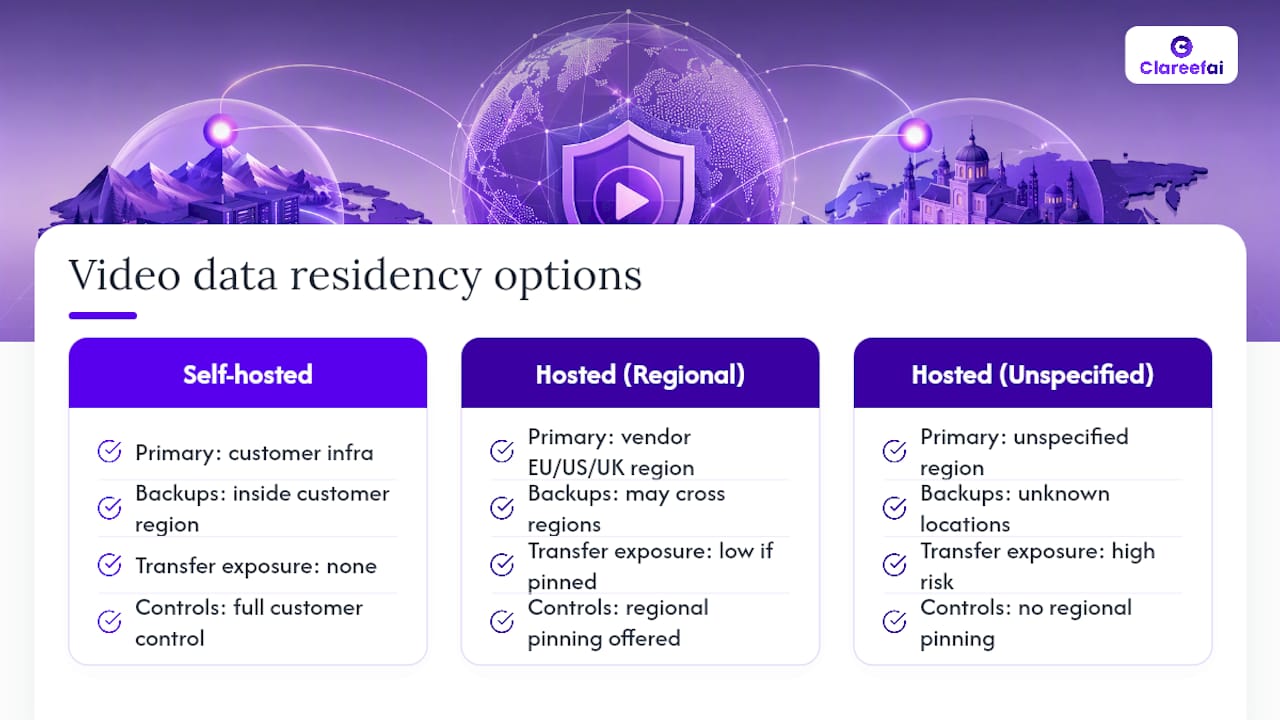
Data residency also intersects with disaster recovery. Ask where backups live, not just primary storage. A vendor that keeps your production data in the EU but backs it up to a US region has quietly reintroduced the exact transfer problem you thought you’d avoided.
Who Actually Touches Your Video Data Behind the Scenes?
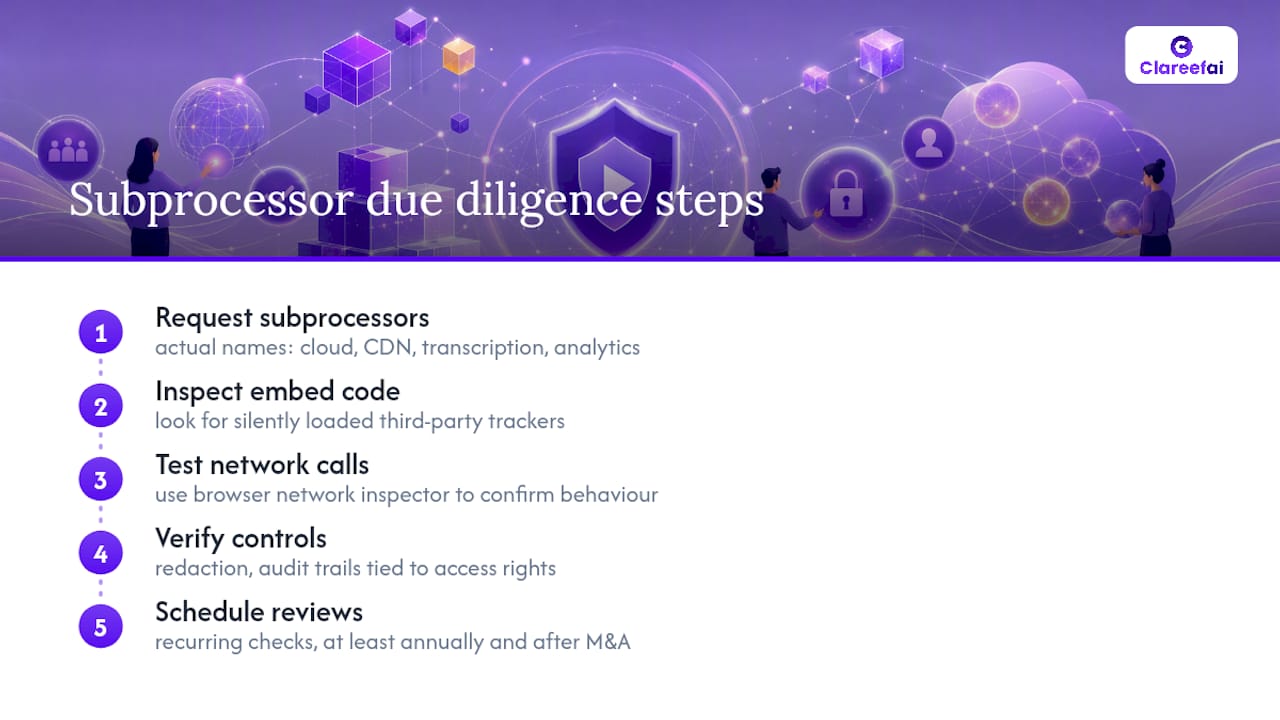
Every video vendor relies on other companies you’ll never negotiate with directly, cloud storage providers, content delivery networks, transcription services, analytics tools. Each one is a subprocessor, and each one is a potential point of failure that has nothing to do with the primary contract you signed.
A subprocessors list should read like a real inventory, not a marketing phrase. Ask for the actual names: which cloud provider stores the video, which CDN serves it, whether a third-party analytics tool is embedded in the player itself. VIDIZMO’s approach to compliance-sensitive sharing illustrates why this matters for enterprises handling regulated content: redaction and audit trails only protect you if you also know every party that has access to the unredacted original.
Watch the embed code itself, not just the contract. Third-party trackers loaded silently inside a video player are a common and underdiscussed leak point. A vendor might have excellent encryption and a clean BAA while still shipping a player that phones home to an ad network. Test this directly with your browser’s network inspector before you trust a vendor’s written claims about “no third-party tracking.”
Subcontractor risk also changes over time. A vendor’s subprocessors list from a year ago may not match today’s, especially after an acquisition or infrastructure migration. Build a recurring review, at minimum annually, into your vendor management process rather than treating the initial procurement check as a one-time event.
What Happens When Something Goes Wrong?
A vendor’s response during an incident tells you more about their actual security posture than any sales deck. Before signing, ask what their incident notification timeline looks like in writing, not “quickly,” but a specific number of hours or days, and whether that timeline is contractual or aspirational.
Support responsiveness matters daily, too, not just during a breach. If your team can’t get a straight answer about a token expiry bug on a Tuesday afternoon, don’t expect a faster answer during an actual incident. Ask for real examples: a support ticket history, an SLA document, or a reference customer who has been through an incident with that vendor.
Post-incident, you want a forensic trail, not just an apology. This is where audit logging earns its keep. A vendor that can hand you a precise record of who accessed a specific video, from what IP, at what time, turns an incident response from guesswork into a factual investigation. That capability should be demonstrated during your onboarding test, not promised for later.
The Vendor Shortlist Only Solves Half the Problem
Most procurement guidance treats video hosting like a checkbox exercise: pick the vendor with the most security badges, sign the contract, move on. That misses the real failure point, which almost never happens at the platform level. It happens in the gap between what a vendor’s contract allows and what your own team actually does with the sharing link once they have it.
A signed BAA doesn’t stop a well-meaning marketer from grabbing an unredacted patient testimonial and pasting the raw link into a public newsletter. A perfect audit log doesn’t help if nobody on your team ever checks it until something has already gone wrong. The technical controls covered here, signed tokens, watermarking, encryption, matter enormously, but they’re only as strong as the internal workflow that decides who gets access in the first place.
If there’s one thing worth prioritizing over another vendor security page, it’s building the internal habit of testing your own assumptions: expire a token and see if it actually stops playback, request the subprocessors list and actually read it, run the onboarding fire drill instead of skipping it because the sales rep seemed trustworthy. The vendor comparison gets you in the door. The internal discipline is what keeps you out of trouble after that.
— ClareefAi
A Secure Home for Your Testimonial Videos Starts With Verification
Privacy-compliant hosting solves where the video lives. It doesn’t solve who consented to appear in it, whether that consent is documented, or how you track which version of a testimonial is the approved one. That’s the gap Clareefai closes. The platform centralizes verified testimonial and video collection, captures consent records at the source, and applies GDPR-focused security features and role-based dashboards so legal, marketing, and sales all see the same verified record instead of three different spreadsheets.
Clareefai pairs naturally with the secure hosting workflows covered in this article. It relies on the same audit trail thinking, who submitted a testimonial, who approved it, when it was published, so your video hosting vendor’s access logs and Clareefai’s consent records tell a consistent story if anyone ever asks. For marketers specifically managing customer advocacy content at scale, the dedicated marketer workflows handle collection and publishing without the manual chasing that usually breaks down under audit scrutiny. If your team is building or auditing a testimonial video program right now, request a demo through Clareefai’s solutions page to see how verified collection fits into the secure hosting setup you’ve just mapped out.
This article is general information, not a substitute for advice from a qualified lawyer. Consult a qualified legal professional about your own circumstances before acting on anything here.
FAQ
What Is the Best Platform to Host Private Videos?
There’s no single best platform. It depends on your use case: SecureVideo fits clinical telehealth, VIDIZMO fits legal and enterprise sharing, SproutVideo fits marketing teams needing SSO and domain restrictions, and self-hosted options like Ollasync fit organizations that need full control over where data lives.
What Video Platforms Are HIPAA Compliant?
Platforms like SecureVideo build specifically toward HIPAA needs, offering BAAs, audit logging, and intrusion prevention, while VIDIZMO and other enterprise platforms can support HIPAA-aligned configurations when a BAA is signed. Always confirm current BAA availability directly with the vendor before assuming coverage.
What Is the Most Secure Video Platform?
Security depends on which controls matter most for your data. A developer team prioritizing leak tracing might favor VidEncrypt’s forensic watermarking, while an organization requiring zero vendor access to plaintext would favor a self-hosted, server-blind option like Ollasync instead.
How Do I Know If a Video Vendor Meets GDPR Requirements?
Request a signed Data Processing Agreement, a current subprocessors list, and confirmation of where data is stored and processed. A vendor unwilling to provide any of these is not GDPR ready regardless of what its marketing page claims.
How Does Clareefai Fit Into a Secure Testimonial Video Workflow?
The platform handles consent capture, identity verification, and role-based access for testimonial content, working alongside your chosen secure video host rather than replacing it, so hosting security and consent documentation stay aligned.
Recommended
Share Article
Stay Updated
Get the latest insights on customer advocacy and SaaS growth delivered to your inbox.