Best Reputation Management Software for Teams: Top Picks
For B2B sales and marketing teams that need verified testimonials and structured advocate workflows, Clareefai is the recommended pick. For broader use cases, the short list breaks down like this:
- Clareefai — Best for B2B testimonial-led sales: verified testimonials, AI promoter identification, CRM publishing, GDPR compliance
- Birdeye — Best for multi-location businesses: centralized review collection and local listings at scale
- Brandwatch — Best for enterprise brand intelligence: deep social listening and consumer trend analysis
- Sprout Social — Best for social-first teams: review management inside social workflows
- BrightLocal — Best for local SEO and SMBs: review aggregation from 80+ sites with local search tools
- InMoment — Best for enterprise CX: structured feedback analytics tied to journey-level insights
Your next step: schedule a demo with your top two picks and run three tasks during each session: collect a review, respond to a negative mention, and export a report. What you see in those 20 minutes tells you more than any feature checklist.
Pro Tip: Before any demo, list the three review sources that matter most to your buyers (Google, Trustpilot, LinkedIn, app stores). If a vendor can’t show you live data from all three in the first 10 minutes, that’s your answer.
Key Takeaways
The best reputation management software for your team depends on your primary buyer job: monitoring, local review growth, enterprise brand intelligence, or B2B testimonial-led sales.
| Point | Details |
|---|---|
| Match tool to buyer job | Multi-location businesses need listings and review routing; B2B sales teams need verified testimonials and CRM integration. |
| Validate in a demo | Run three tasks during every demo: collect a review, respond to a negative one, and export a report. |
| Pricing scales with scope | Entry-level tools start at $39–$99/month; enterprise platforms with multi-location and managed services are custom-priced. |
| Security is non-negotiable | Confirm SSO, role-based access, GDPR compliance, and data export before signing any enterprise contract. |
| Clareefai for B2B testimonials | Clareefai’s AI promoter ID, verified testimonial workflows, and CRM publishing make it the strongest fit for B2B sales teams. |
Table of Contents
- What is the best reputation management software right now?
- How we evaluated and scored these tools
- Mini reviews: what each tool actually does
- How to choose the right reputation management software for your business
- What does reputation management software actually cost?
- Integrations, security, and technical considerations
- Match tools to buyer jobs: recommended tool by use case
- When should you choose a testimonial platform instead of a broad reputation suite?
- Why the “best” tool is rarely the most feature-rich one
- Clareefai is built for B2B teams that sell with verified testimonials
- Sources
What is the best reputation management software right now?
Reputation management software is a digital suite for monitoring, collecting, responding to, and showcasing customer feedback across review sites, social media, and search results. Enterprise-grade platforms typically add AI sentiment analysis, automated review request workflows, business listing management, and cross-channel analytics dashboards.
The table below covers all 27 tools in this comparison. Clareefai leads as the featured pick for B2B testimonial-driven teams; the remaining rows are ordered by use-case fit.
Three buyer-profile shortcuts:
- Enterprise brand intelligence: Brandwatch, InMoment, Reputation.com, Meltwater
- Multi-location local businesses: Birdeye, BrightLocal, Podium, Synup
- B2B testimonial-first sales teams: Clareefai, then consider pairing with Brand24 for mention monitoring
How we evaluated and scored these tools
The goal was straightforward: give decision-makers a shortlist they can act on, not a padded list of every tool with a review page. Evaluation covered six dimensions: feature accuracy, channel coverage, usability, integration depth, security posture, and trial or demo accessibility.
Evaluation process:
- Feature verification: Each tool’s feature claims were cross-checked against vendor documentation, live demo recordings, and third-party review platforms including G2 and Capterra.
- Channel coverage checks: We mapped which review sources, social platforms, and directories each tool actually monitors versus what marketing pages claim.
- Demo verification: Where free trials or demo environments were available, we ran three standard tasks: initiate a review request, respond to a negative review, and export a performance report.
- Pricing research: Starting prices were sourced from public pricing pages and corroborated by market roundups and vendor-confirmed figures.
- Security and compliance: GDPR posture, SSO availability, and data residency options were verified from vendor documentation.
- Third-party signals: G2 and Capterra ratings were used as supporting signals alongside feature depth, not as the primary ranking criterion.
Scoring bands used:
- Tier 1 (recommended): Strong feature depth, verified integrations, clear pricing or demo path, positive third-party signals
- Tier 2 (solid alternative): Good fit for a specific use case but limited in scope or scale
- Tier 3 (niche/specialist): Serves a narrow job well (app stores, content removal, free monitoring) but not a full-stack solution
Mini reviews: what each tool actually does
The profiles below follow the same logic as the comparison table: start with the tool’s real job, then its limits. Clareefai leads because it’s the publisher’s platform and the recommended pick for B2B testimonial-driven teams. Every other entry is factual and use-case specific.
Clareefai
Best for: Mid-size and large B2B organizations whose sales cycle depends on verified customer testimonials, reference calls, and structured advocate programs.
Clareefai sits in a different category from most tools on this list. Where Birdeye or ReviewTrackers aggregate public reviews, Clareefai builds a verified library of customer testimonials, video reviews, and case studies that sales reps can deploy at specific deal stages. The AI promoter identification engine surfaces which customers are most likely to advocate, then automates the outreach to collect their testimonials. Everything collected is identity-verified and GDPR-compliant, which matters when enterprise prospects ask for proof of compliance before signing.
Standout capability: CRM-integrated testimonial publishing. Sales reps can pull verified testimonials directly into their workflows without leaving Salesforce or HubSpot.
Core features: Testimonial and video review collection, AI promoter identification, verified identity management, multi-role dashboards, cross-channel publishing, advocacy analytics, GDPR-compliant data management, real-time sync.
Key integrations: Salesforce, HubSpot, and major CRM platforms; review site publishing; marketing automation tools.
Pros:
- Verified testimonials carry more weight with enterprise buyers than anonymous reviews
- AI promoter ID reduces the manual work of finding willing advocates
- GDPR compliance and role-based access built in from day one
Cons:
- Designed for B2B; not the right fit for B2C or consumer review aggregation
- Requires an active customer base to generate testimonials
- Broader social listening is not its primary function
Demo focus: Ask to see the AI promoter identification workflow and how a testimonial moves from collection to a live CRM opportunity.
Birdeye
Best for: Multi-location businesses (franchises, healthcare networks, retail chains) that need centralized review collection and listings management across dozens or hundreds of locations.
Birdeye’s strength is operational scale. A franchise with 200 locations can manage review requests, responses, and listing accuracy from a single dashboard. The platform covers 150+ review sites and includes messaging tools for customer interactions. Its reporting layer lets regional managers track performance by location without needing IT support.
Pros: Strong multi-location workflows, broad review site coverage, solid messaging tools Cons: Custom pricing makes budgeting opaque; enterprise contracts can be long-term
Yext and Yext Digital Presence Platform
Best for: Brands that need authoritative control over how they appear in search results and across 200+ directories.
Yext’s core product is its knowledge graph, which pushes consistent business data (hours, addresses, services) to directories, voice assistants, and search engines. The Digital Presence Platform adds review monitoring and response tools on top of that listings foundation. For businesses where incorrect listing data is actively hurting search visibility, Yext solves a real problem. The trade-off: it’s primarily a listings and search-presence tool, not a deep review analytics platform.
Pros: Unmatched directory coverage, strong search-visibility features, knowledge graph accuracy Cons: Review management is secondary to listings; pricing is enterprise-level
Sprout Social
Best for: Social media and community teams that want reputation management woven into their existing social publishing and engagement workflows.
Sprout Social approaches reputation from the social side first. Review management, social listening, and community engagement live in the same interface where your team already schedules posts and responds to comments. Sprout’s guidance recommends choosing tools based on your primary operational focus, and for social-first teams, that logic points directly back to Sprout. The platform’s sentiment analysis covers Twitter/X, Facebook, Instagram, and Google reviews.
Pros: Unified social and review management, strong sentiment analysis, good team collaboration tools Cons: Starts around $249/month, which is steep for teams that only need review monitoring
Podium
Best for: Local businesses (auto dealers, dental practices, home services) that collect reviews primarily through SMS and want a single inbox for customer messaging.
Podium’s differentiation is its SMS-first approach. Review requests go out by text, which consistently outperforms email for response rates in local business contexts. The platform also handles payments and webchat, making it a broader customer communication tool. Starting around $399/month, it’s priced for businesses where review volume directly drives foot traffic.
Pros: High SMS review response rates, combined messaging and payments, easy setup Cons: Higher starting price; less suited for B2B or enterprise use cases
Reputation.com
Best for: Large enterprises that need governance, multi-location reporting, and a single platform for reviews, listings, and surveys.
Reputation.com is one of the original enterprise reputation platforms. Its reporting layer handles complex org structures, and its analytics cover review sentiment, listing accuracy, and customer survey data in one place. Custom pricing and dedicated customer success managers are standard at this tier.
Pros: Strong enterprise governance, broad channel coverage, mature analytics Cons: Custom pricing; implementation timelines can be long
ReviewTrackers
Best for: Teams managing reviews across many locations that need consolidated reporting and flexible export options.
ReviewTrackers aggregates reviews from 100+ sites and routes them into a single dashboard. Its reporting tools are flexible enough for agencies managing multiple client accounts. Starting around $119/month, it’s one of the more accessible options for mid-market teams.
Pros: Broad review site coverage, solid reporting, agency-friendly Cons: AI features are less developed than enterprise competitors
Brandwatch
Best for: Enterprise teams that need deep historical social data, audience segmentation, and trend detection across social, news, and forums.
Brandwatch is a consumer intelligence platform first and a reputation tool second. Its strength is the depth of its data: historical social listening, audience analysis, and trend detection that most reputation tools can’t match. For brand strategy and crisis detection, it’s a serious tool. For local review management, it’s overkill.
Pros: Best-in-class social intelligence, strong historical data, advanced AI analytics Cons: Custom enterprise pricing; steep learning curve; not designed for review collection
BrightLocal
Best for: SMBs and local agencies focused on local search rankings and review growth.
BrightLocal’s Reputation Manager aggregates reviews from 80+ sites, sends automated email and SMS review requests, and lets you reply to Google and Facebook reviews directly from the platform. For local businesses where improved review volume directly affects local search discovery, BrightLocal delivers strong ROI at a starting price of $39/month. It also publishes selected testimonials to your website, which adds a lightweight social proof layer.
Pros: Affordable, strong local SEO integration, 80+ review site coverage Cons: Limited enterprise features; not built for B2B testimonial workflows
Trustpilot
Best for: Brands that rely on a public review marketplace to build consumer trust at scale.
Trustpilot’s value is its consumer recognition. Buyers know the platform, which gives a Trustpilot badge credibility that a private review widget can’t replicate. A free tier exists for basic profiles; paid plans start around $259/month and add review invitations, analytics, and widget customization.
Pros: Strong consumer brand recognition, public review visibility, free entry tier Cons: Less control over review content; not suited for B2B sales workflows
ReviewFlowz
Best for: SMBs and agencies that want a simple, centralized review inbox without a complex setup.
ReviewFlowz pulls reviews from Google, Facebook, Trustpilot, and G2 into a single inbox and sends Slack notifications for new reviews. Starting around $49/month, it’s one of the easiest tools to get running in under an hour. The trade-off is limited depth: no listings management, no advanced AI, no multi-location governance.
Pros: Fast setup, Slack integration, affordable Cons: Limited to monitoring and basic automation; no listings or advanced analytics
NetReputation, Reputation Pros, and Erase.com
These three are managed services, not self-serve software platforms. They specialize in content suppression, negative search result remediation, and profile rebuilding for organizations or individuals dealing with damaging online content. Pricing is custom and project-based. If your need is defensive reputation repair rather than proactive review management, these services address that specific job. They are not substitutes for a full reputation management platform.
AppFollow
Best for: Mobile app teams managing App Store and Google Play reviews at scale.
AppFollow monitors app store reviews, surfaces sentiment trends, and integrates with Zendesk and Slack for response workflows. Starting around $93/month, it’s purpose-built for mobile product teams. Its ASO-adjacent features also help teams understand how review sentiment correlates with app store ranking changes.
Pros: Purpose-built for app stores, Zendesk integration, sentiment trending Cons: Limited value outside mobile app contexts
Brand24
Best for: SMBs and PR teams that need broad mention coverage across social, news, blogs, and podcasts.
Brand24 monitors mentions in real time and scores sentiment across a wide range of sources. Starting at $99/month, it’s accessible for smaller teams. Its AI-driven brand-building applications pair well with AI-driven brand strategies, which use sentiment data to inform content and positioning decisions.
Pros: Broad source coverage including podcasts, real-time alerts, affordable Cons: No review collection or listings management
RightResponse AI
Best for: Teams that need to scale review response volume without hiring more staff.
RightResponse AI drafts replies to reviews using AI, pulling context from the review content and your business profile. Starting around $59/month, it’s a practical tool for businesses receiving high review volumes across Google, Facebook, and Yelp. The AI-generated replies still need human review before posting, but they cut drafting time significantly.
Pros: Reduces response time, affordable, easy to configure Cons: AI replies require human oversight; limited to response automation
Synup, NiceJob, Grade.us, and Broadly
These four serve overlapping SMB and agency use cases with slightly different emphases. Synup focuses on directory listings and local review monitoring. NiceJob automates review requests and referral programs for service businesses. Grade.us targets agencies that need white-label review widgets and distribution tools. Broadly keeps things simple for small businesses that want review collection and customer messaging without complexity. None of them are enterprise-grade, and none are built for B2B testimonial workflows.
InMoment
Best for: Enterprise CX teams that need structured feedback analytics tied to customer journey stages.
InMoment goes deeper than most reputation tools on the analytics side. Its platform combines survey distribution, feedback aggregation, and journey-level insight reporting. For organizations where CX metrics feed directly into product roadmaps and executive dashboards, InMoment’s depth justifies its custom enterprise pricing.
Pros: Advanced feedback analytics, journey-level insights, enterprise integrations Cons: Custom pricing; implementation complexity; not a review collection tool
Mention, Qualtrics, Google Alerts, and Meltwater
Mention delivers real-time alerts across social, news, and blogs starting around $41/month, making it a solid lightweight monitoring tool for brands and agencies. Qualtrics combines survey-led feedback with reputation analytics for enterprise organizations that need structured data tied to reputation metrics. Google Alerts is free and useful for baseline monitoring, but it covers only Google’s web index and has no analytics, response tools, or integrations. Meltwater targets PR and communications teams with news monitoring, social listening, and analyst-style reporting at custom enterprise pricing.
Pro Tip: For SMBs managing their online reputation on a limited budget, pairing Google Alerts (free) with ReviewFlowz (~$49/month) gives you baseline mention coverage and a centralized review inbox for under $50/month. Scale up when volume justifies it.
How to choose the right reputation management software for your business
The right tool depends on where your reviews live, how your team works, and what outcome you’re actually optimizing for. Industry guidance consistently points to operational focus as the primary selection criterion: multi-location businesses need listing and local review routing; enterprise social teams need integrated listening and governance.
Must-have vs. nice-to-have by buyer profile
Enterprise (500+ locations or global brand):
- Must-have: multi-location governance, role-based access, SSO, API access, dedicated CSM, SLA
- Nice-to-have: advanced AI sentiment, crisis detection, custom reporting
Agency managing multiple clients:
- Must-have: white-label options, multi-account management, flexible reporting, review widget distribution
- Nice-to-have: automated client reporting, Slack notifications
Multi-location local business:
- Must-have: listings management, automated review requests, Google and Facebook response tools
- Nice-to-have: SMS review requests, local SEO integration
B2B sales and marketing team:
- Must-have: verified testimonial collection, CRM integration, advocate identification, GDPR compliance
- Nice-to-have: video testimonials, reference call coordination, sales enablement dashboards
Questions to ask vendors during a demo
- Which review sources do you monitor natively, and which require a third-party connector?
- What does the review request workflow look like end-to-end, from trigger to published review?
- What are your SLAs for support response, and what does onboarding include?
- How do you handle data residency and GDPR compliance for EU customer data?
- What are the API rate limits, and do you support webhooks for real-time data sync?
- How long does a typical implementation take for a team our size?
Red flags to watch for
- Opaque pricing: If a vendor won’t give you a ballpark number before a demo, budget overruns are likely.
- Missing integrations: A tool that doesn’t connect to your CRM or helpdesk will create manual work that kills adoption.
- Weak multi-location handling: If location-level filtering requires a support ticket, it’s not built for scale.
- No data export: Vendor lock-in starts when you can’t get your own review data out.
Pro Tip: During your trial, ask support a technical question you already know the answer to. The response time and accuracy of that answer tells you exactly what post-sale support will look like.
What does reputation management software actually cost?
Pricing across this category ranges from free to custom enterprise contracts, and the gap between those two ends is significant. Here’s how the tiers break down in practice.
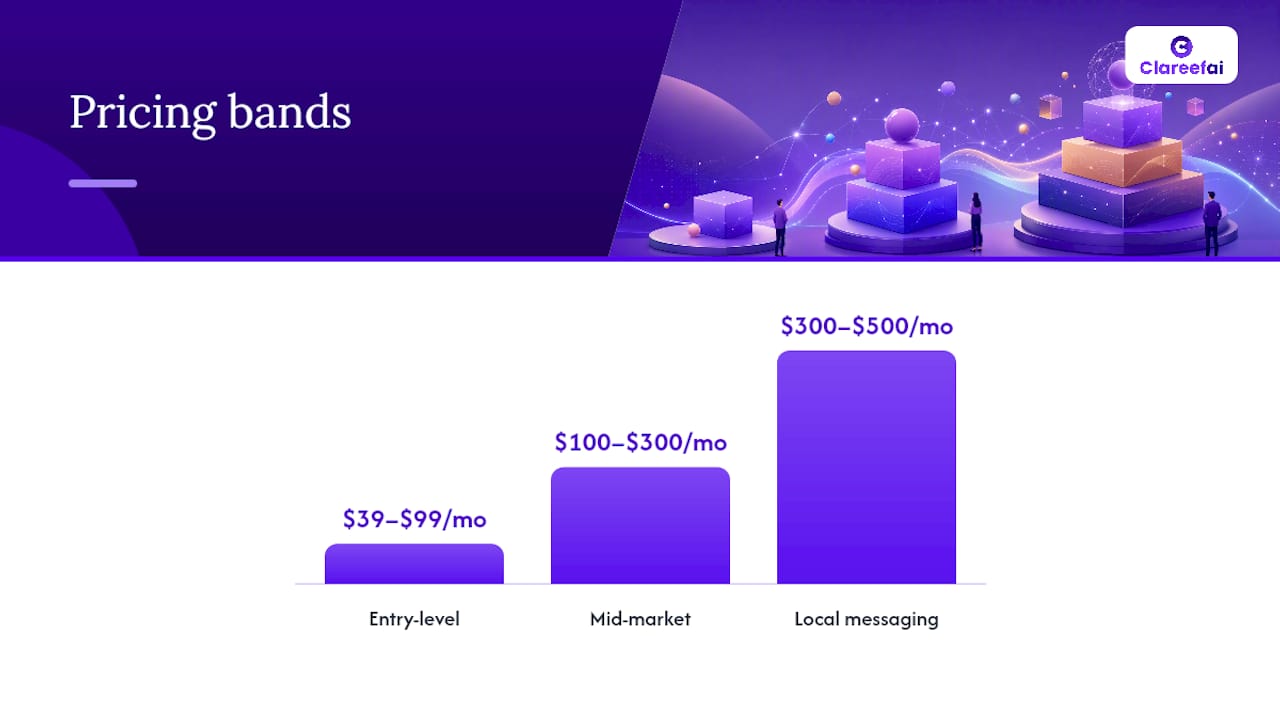
Pricing bands:
- Free: Google Alerts (web mention monitoring only, no analytics or response tools)
- $39–$99/month: BrightLocal ($39), ReviewFlowz (~$49), RightResponse AI (~$59), NiceJob (~$75), Brand24 ($99) — entry-level monitoring, review requests, or mention tracking
- $100–$300/month: ReviewTrackers (~$119), AppFollow (~$93), Grade.us (~$110), Trustpilot (~$259), Sprout Social (~$249) — mid-market with broader coverage and reporting
- $300–$500/month: Podium (~$399) — local messaging and review collection with payments
- Custom enterprise: Birdeye, Yext, Reputation.com, Brandwatch, InMoment, Meltwater, Qualtrics, Synup, Broadly, Reputation Pros, NetReputation, Erase.com — pricing depends on locations, seats, channels, and managed services
What drives the price up:
- Number of locations or accounts monitored
- Number of review sources and social channels covered
- API access and webhook support
- Managed services (dedicated CSM, white-glove onboarding)
- SLA guarantees and enterprise security features (SSO, SAML, audit logs)
- AI features beyond basic sentiment (crisis detection, predictive analytics)
Negotiation tips for enterprise deals:
- Ask for a pilot at a subset of locations before committing to a full rollout.
- Request annual billing with a monthly out clause for the first year.
- Push for included onboarding hours rather than accepting a paid implementation package.
- Clarify whether API access is included or a paid add-on before signing.
A common pattern worth noting: tools marketed as “affordable” often charge per location, so a business with 50 locations paying $10/location/month is actually spending $500/month before any add-ons.
Integrations, security, and technical considerations
Before you sign a contract, your IT and operations stakeholders need answers on three fronts: integrations, security, and deployment. Enterprise brand-protection platforms like Sprinklr emphasize unified CX and crisis detection across 30+ channels with cross-team workflows, which only works if the platform connects cleanly to your existing stack.
Integrations that move the needle
The integrations that actually drive adoption are the ones your team already uses daily:
- Salesforce and HubSpot: Critical for B2B teams. If testimonials and review data don’t flow into your CRM, sales reps won’t use them.
- Zendesk and Freshdesk: Routing negative reviews to support tickets closes the loop between reputation and customer service.
- Slack and Microsoft Teams: Real-time review alerts in team channels drive faster responses without requiring anyone to log into another platform.
- Google Analytics and Looker Studio: Connecting review data to web analytics lets you measure the impact of reputation on traffic and conversions.
- Marketing automation (Marketo, Pardot): Triggering testimonial requests based on CRM lifecycle events automates the collection workflow.
For B2B teams specifically, secure testimonial management requires CRM-native publishing so verified testimonials reach prospects at the right deal stage, not just on a static website page.
Security and data privacy checklist
| Requirement | Why It Matters |
|---|---|
| SSO (SAML / OAuth) | Reduces credential risk; required by most enterprise IT policies |
| Role-based access control | Limits who can publish, respond, or export data |
| GDPR compliance | Required for any EU customer data; verify data residency options |
| Data deletion and retention policies | Needed for compliance audits and customer data requests |
| Encryption at rest and in transit | Standard security baseline; confirm TLS and AES encryption |
| Audit logs | Required for SOC 2 and enterprise security reviews |
Technical questions to ask before signing
- What are the API rate limits per endpoint, and do you offer dedicated API tiers?
- Do you support webhooks for real-time event delivery?
- What export formats are available (CSV, JSON, API)?
- Can you ingest offline or in-person review data?
- What is the typical deployment timeline for a team of our size?
For enterprise rollouts, SSO and role-based permissioning plus staged onboarding per team reduces adoption friction more than any UI improvement. Plan your rollout in phases: pilot with one team or location, validate the integration, then expand.
Match tools to buyer jobs: recommended tool by use case
Different buyer jobs require fundamentally different capabilities. The table below maps each profile to the tool categories and specific picks that fit best.
| Buyer Profile | Recommended Tool(s) | Rationale |
|---|---|---|
| Multi-location local business | Birdeye, BrightLocal, Podium, Synup | Listings sync, automated review requests, Google/Facebook response at scale |
| Enterprise brand intelligence | Brandwatch, InMoment, Reputation.com, Meltwater | Deep social listening, governance, journey analytics, PR monitoring |
| Mobile app teams | AppFollow | Purpose-built for App Store and Google Play review workflows |
| SMB local (budget-conscious) | BrightLocal, ReviewFlowz, NiceJob | Affordable entry points with core review collection and monitoring |
| B2B testimonial-led sales | Clareefai | Verified testimonials, AI promoter ID, CRM publishing, GDPR compliance |
| Social-first marketing teams | Sprout Social, Brand24, Mention | Social listening and engagement inside existing social workflows |
| Agency managing multiple clients | Grade.us, ReviewTrackers, BrightLocal | White-label options, multi-account management, flexible reporting |
| PR and communications | Meltwater, Brandwatch | News monitoring, media coverage tracking, analyst-style reporting |
| Reputation repair | NetReputation, Reputation Pros, Erase.com | Managed content suppression and search result remediation |
When the same tool serves two use cases: BrightLocal works for both SMB local businesses and local agencies managing multiple client accounts. The difference is configuration: agencies use the white-label reporting and multi-account dashboard, while single-location businesses use the review request automation and local SEO tools. Similarly, Sprout Social serves both social-first marketing teams and PR teams that need social listening alongside publishing.
When to combine tools rather than choose one: A B2B sales team might run Clareefai for verified testimonial collection and CRM publishing, while using Brand24 or Mention for real-time web mention monitoring. These are complementary jobs. A single platform that tries to do both often does neither particularly well. For managing online reputation as an SMB, starting with a focused tool and adding a second when volume justifies it is a more practical approach than buying an enterprise suite on day one.
When should you choose a testimonial platform instead of a broad reputation suite?
Most reputation tools are built defensively: monitor mentions, respond to reviews, suppress negative content. That’s valuable, but it misses the offensive opportunity. Organizations that treat reputation tools as monitoring-only miss the chance to systematize promoter activation, which is critical for B2B growth.
A testimonial and advocacy platform like Clareefai is the right choice when your primary goal is converting satisfied customers into active sales assets, not just tracking what people say about you.
Choose a testimonial and advocacy platform when:
- Your sales cycle depends on peer validation (reference calls, case studies, verified testimonials)
- You need to identify which customers are most likely to advocate and automate outreach to them
- Your CRM is the center of your sales workflow and testimonials need to live there
- You operate in a regulated industry where anonymous reviews create compliance risk
- You need GDPR-compliant identity verification for customer testimonials
- Your marketing team needs a library of verified, contextual social proof for campaigns
Choose a broad reputation suite when:
- You manage reviews across many public platforms (Google, Yelp, Facebook) and need a single inbox
- Your primary concern is local search visibility and listing accuracy
- You need enterprise-grade social listening and crisis detection
- Your team is social-first and reputation management is one function among many
The distinction matters because testimonial-focused platforms should be measured on conversion lift and sales cycle impact, not just review counts. Trackable KPIs include demo-to-close rate change, shortened sales cycle length, and reference usage per opportunity. These are sales metrics, not marketing metrics, and broad reputation suites rarely surface them.
Clareefai’s AI promoter identification engine addresses the hardest part of this workflow: knowing which customers to ask. Most B2B teams have a handful of advocates they rely on repeatedly, burning out those relationships. AI-driven promoter scoring surfaces a broader pool of willing advocates based on engagement signals, NPS data, and CRM activity. The result is a more sustainable, scalable advocacy program.
For a practical look at reputation management examples that actually work in B2B contexts, the pattern is consistent: structured testimonial programs outperform ad-hoc review collection when the sales cycle is complex and the buyer is risk-averse.
Why the “best” tool is rarely the most feature-rich one
The most common mistake in evaluating top reputation management tools is treating the feature list as the scorecard. A platform with 50 integrations and AI-powered everything is only valuable if your team actually uses it. The tools that move the needle are the ones that fit your team’s daily workflow without requiring a behavior change.
There’s a real tension in this category between breadth and depth. Broad reputation suites cover monitoring, review collection, listings, social listening, and analytics in one platform. That breadth is genuinely useful for large organizations with diverse needs. But for a B2B sales team whose primary job is closing deals, a platform that does 10 things adequately is less valuable than one that does testimonial verification and CRM publishing exceptionally well.
The other underappreciated factor is data quality. A reputation platform that aggregates 100+ review sites sounds impressive until you realize that 80 of those sites generate zero reviews for your business. What matters is depth of coverage on the three or four sources your buyers actually check. Validate that in your demo before anything else.
One more thing worth saying plainly: the reputation marketing function is increasingly a revenue driver, not just a brand protection exercise. Organizations that treat it as a defensive cost center miss the compounding value of a well-run advocacy program. The best reputation management software for your team is the one that helps you build that program, not just monitor the one you already have.
Clareefai is built for B2B teams that sell with verified testimonials
The tools on this list solve real problems. But if your primary buyer job is accelerating B2B deals with verified social proof, most of them are solving a different problem than yours.
Clareefai’s platform for sales and marketing teams is built specifically for this: collect verified testimonials and video reviews, identify your best advocates with AI, publish that proof directly into CRM workflows, and measure the impact on deal velocity. Every testimonial is identity-verified and GDPR-compliant, which matters when your prospects are enterprise buyers with procurement checklists.
A free trial gives you access to the testimonial collection workflow, the AI promoter identification engine, and the CRM publishing integration. In your first demo session, run these three tasks: collect a testimonial from a recent customer, publish it to a live CRM opportunity, and pull an advocacy analytics report. Those three tasks will show you whether the platform fits your sales motion. Start your free trial or schedule a demo and see how verified testimonials change the conversation with your next prospect.
Sources
The sources below were used to verify feature claims, pricing shapes, and use-case guidance throughout this comparison.
- Reputation Management Software | Gartner
- Top 15 Online Reputation Management Tools | Sprout Social
- 26 Best Reputation Management Software Reviewed In 2026
- Reputation Manager | BrightLocal
Recommended
Share Article
Stay Updated
Get the latest insights on customer advocacy and SaaS growth delivered to your inbox.