12 Ways to Build Trust Online for Business Owners
The fastest way to build trust online is to combine baseline safety signals with visible social proof and predictable communication, then sequence them into immediate wins, short-term credibility builders, and sustaining habits.
Start here:
- Day 1: Install SSL/HTTPS, publish a plain-language privacy policy, and add visible contact information.
- Week 1: Add verified customer reviews, a clear About page, and a money-back or trial guarantee.
- Month 1: Launch a testimonial collection workflow, audit your UX for friction, and establish a review-response cadence.
The priority ranking is simple: safety first (permission to play), then clarity (what you do and for whom), then social proof (others’ experience), then competence signals (case studies, certifications), and finally advocacy (reference calls, promoters). Skip a layer and the layers above it won’t hold.
Table of Contents
- 1. Understand the hierarchy of online trust signals
- 2. Secure your site and publish transparent policies
- 3. Use social proof that actually converts
- 4. Design your site so credibility is instant
- 5. Make contact easy and your About page worth reading
- 6. Use guarantees and third-party seals strategically
- 7. Audit and maintain your trust signals regularly
- 8. Follow a 30/60/90-day plan to build trust fast
- 9. Build a testimonial playbook from collection to publication
- Key Takeaways
- Trust is an operational habit, not a one-time project
- Clareefai helps you operationalize testimonial trust at scale
- Useful sources and further reading
1. Understand the hierarchy of online trust signals
Not all trust signals carry equal weight, and the order in which visitors encounter them determines whether they stay or leave.
“When someone lands on your website, they’re making an instant judgment: Can I trust this business? That decision happens before they read your content, before they understand your offering, often before they consciously realize they’re evaluating you.” — William Alexander
Research confirms that visitors form a credibility judgment very quickly, which means your visual design, site speed, and above-the-fold messaging carry the first vote. The “Online Trust Stack” framework groups signals into a recommended sequence: clarity → consistency → human story → third-party mentions → safe next step → reputation buffer → content trail. Each layer builds on the one before it.
Map your pages to the right signal tier:
-
Homepage: Safety markers (HTTPS padlock, recognizable payment logos), a clear headline stating who you serve and what outcome you deliver, and one or two short testimonials.
-
Product/service pages: Detailed social proof (named reviews, case studies), certifications, and specific guarantees.
-
Checkout/contact forms: Security badges near the submit button, a brief privacy note, and a low-friction reassurance line (“We’ll never share your information”).
-
Email sequences: Consistent sender name, plain-language subject lines, and a clear unsubscribe option.
Pro Tip: One small consistency error, such as a CTA button that says “Get a Quote” on the homepage but “Request Pricing” on the product page, can undermine higher-level trust signals. Run a quarterly copy audit using a simple spreadsheet to catch these mismatches before visitors do.
2. Secure your site and publish transparent policies
Security and transparent data handling are baseline expectations, not differentiators. Customers expect both, and their absence is an immediate disqualifier.
Baseline security checklist:
- HTTPS on every page (not just checkout), verified via your browser’s padlock icon and tools like SSL Labs.
- A recognized payment processor (Stripe, PayPal, Authorize.Net) with its badge displayed near the payment form.
- A functioning cookie consent banner that gives visitors a real choice, not a pre-checked “accept all.”
- A plain-language privacy policy that explains what data you collect, why, and how long you keep it. Avoid legalese; a readable policy signals respect.
Where to display these signals:
- HTTPS padlock: visible in the browser bar at all times.
- Payment security badges: directly adjacent to the payment fields.
- Privacy policy link: in the footer, in email footers, and linked from every form.
- Cookie consent: triggered on first visit, with a clear “Manage preferences” option.
Quick test: open your site in an incognito window and walk through a purchase or form submission as a first-time visitor. If you feel any hesitation about entering your information, your visitors feel it too.
3. Use social proof that actually converts
Authentic reviews, photos, and videos influence purchasing decisions more than polished marketing language. The format and placement of that proof matter as much as its existence.
Prioritized social proof formats:
- Verified reviews — (Google Business Profile, BBB, Trustpilot) with a visible badge linking to the live review page.
| Format | Best placement | Trust signal strength |
|---|---|---|
| Verified third-party review badge | Homepage hero, checkout | High |
| Named testimonial with photo | Product page, sales email | High |
| Case study with metrics | Proposal, demo follow-up | Very high |
| User photo or video | Product page, social ads | Medium-high |
| Star rating aggregate | Google snippet, landing page | Medium |
Pro Tip: Highly polished, flawless testimonials can trigger skepticism. The most persuasive social proof includes a specific problem, a concrete result, and a small imperfection or caveat that signals the reviewer is a real person. “It took us two weeks to get the integration right, but after that, our close rate jumped 30%” outperforms “Amazing product, highly recommend” every time.
For collecting reviews, timing is important. It is recommended to send the request shortly after a positive interaction, such as a successful onboarding call or a resolved support ticket. For U.S. businesses, the FTC requires that any incentivized review be clearly disclosed. Never offer rewards in exchange for positive-only reviews; offer them for honest feedback and disclose the incentive. See the Clareefai guide to building trust with reviews for a full workflow.
4. Design your site so credibility is instant
Clean, consistent design and fast loading build trust before a visitor reads a single word. First impressions form in about 50 milliseconds, which leaves no room for slow pages, cluttered layouts, or stock photos that look like they came from a 2009 brochure.
Mini-audit: five things to check this week
- Speed: Run your homepage through Google PageSpeed Insights. A score below 70 on mobile is a trust liability.
- Mobile responsiveness: Open your site on a phone. If text is tiny or buttons overlap, fix it before anything else.
- Headline clarity: Your above-the-fold headline should answer three questions in one sentence: what you do, who it’s for, and what outcome they get.
- Image quality: Replace generic stock photos with real team photos, product screenshots, or customer-submitted images.
- Microcopy near forms: Add a one-line reassurance below every form field that collects sensitive data (“Your email is safe with us. No spam, ever.”).
Common trust-killing UX errors and their fixes:
- Broken links → run a monthly crawl with Screaming Frog or Ahrefs.
- Outdated copyright year in the footer → automate it with a simple script.
- Inconsistent fonts or colors across pages → document a brand style guide and enforce it.
- Pop-ups that fire immediately on landing → delay them by at least 30 seconds or trigger on exit intent.
Pro Tip: A real team photo on your About page, even a casual one taken on a phone, raises perceived authenticity more than an expensive redesign. Authenticity in branding is a measurable trust driver, not just a soft concept.
5. Make contact easy and your About page worth reading
Visible contact information and plain-language policies reduce friction and signal accountability. A business that is hard to reach feels like a business that does not want to be held accountable.
About page must-haves:
- Team member names, roles, and short bios (two to three sentences each).
- A founding story that explains why the company exists, not just what it sells.
- A stated set of values with one concrete example of each in practice.
- A direct email address or phone number, not just a contact form.
Microcopy that reduces perceived risk:
- Email auto-reply: “Thanks for reaching out. You’ll hear from a real person within one business day.”
- Chat greeting: “Hi, I’m [Name] from the [Team] team. What can I help you with today?”
- Demo CTA: “Book a 20-minute call. No sales pressure, no long-term commitment required.”
- Download CTA: “Get the guide. No email sequence, just the PDF.”
Low-risk next steps reduce perceived buying risk more effectively than any guarantee. Offer a guide download before a demo request, and a demo before a proposal. Each step earns the next.
Where to place contact details and policy links:
- Footer: phone, email, physical address (if applicable), links to Privacy Policy and Terms of Service.
- Header: a “Contact” nav item or a phone number for high-consideration purchases.
- Checkout and forms: a privacy note and a link to your full policy.
- Email signatures: name, title, direct phone, and a one-line company descriptor.
6. Use guarantees and third-party seals strategically
Guarantees and independent seals move the needle when they are relevant, verifiable, and explained. A badge with no context is visual noise; a badge with a one-line explanation is a trust signal.
What works and what to avoid:
- Do: Display BBB accreditation, industry-specific certifications (SOC 2, ISO 27001 for SaaS), and recognized payment security logos near the point of decision.
- Do: Add a one-line explanation next to each badge (“SOC 2 Type II certified — your data is audited annually by an independent firm”).
- Don’t: Stack five or six badges in a row without explanation; it reads as desperation, not credibility.
- Don’t: Display a certification that has lapsed or that you are still pursuing.
Choosing which certifications to pursue:
- Start with what your buyers already recognize. Ask your sales team which certifications come up in procurement conversations.
- Prioritize certifications that are audited by a third party over self-declared ones.
- For U.S. e-commerce, PCI DSS compliance is a baseline requirement for handling card data, not a differentiator.
On guarantees: A money-back guarantee or a no-questions-asked trial period works best when the risk of purchase is the main objection. State the terms clearly (“30-day full refund, no questions asked”) and link to a page that explains the process. Vague guarantees (“satisfaction guaranteed”) generate skepticism, not confidence.
7. Audit and maintain your trust signals regularly
Minor oversights like broken links, outdated testimonials, and conflicting messaging cumulatively erode trust. A regular audit cadence prevents small problems from compounding into credibility gaps.
| Audit type | Recommended cadence | Owner | Tool |
|---|---|---|---|
| Broken links | Monthly | Marketing/Web | Screaming Frog, Ahrefs |
| Review volume and sentiment | Weekly | Customer Success | Google Alerts, Trustpilot dashboard |
| Policy freshness (privacy, terms) | Quarterly | Legal/Compliance | Manual review |
| SSL certificate expiry | Monthly | IT/DevOps | SSL Labs, hosting dashboard |
| Testimonial freshness | Quarterly | Marketing | CRM or testimonial platform |
| Page speed scores | Monthly | Web/Dev | Google PageSpeed Insights |
Key metrics to track:
- Bounce rate on landing pages (a sudden spike often signals a broken trust signal).
- Conversion rate by traffic source (organic vs. paid vs. referral gaps reveal where trust breaks down).
- Review volume and average rating over time.
- Response SLA for support tickets and contact form submissions.
For multi-channel social proof publishing and sentiment tracking, a centralized platform reduces the manual overhead of monitoring across Google, LinkedIn, and industry review sites simultaneously.
8. Follow a 30/60/90-day plan to build trust fast
A clear, phased plan lets you assign owners, estimate effort, and measure progress without trying to fix everything at once.
30 days (quick wins, low effort, high impact):
- Install HTTPS and verify SSL across all pages.
- Publish or update your privacy policy in plain language.
- Add visible contact information to your header and footer.
- Claim and optimize your Google Business Profile.
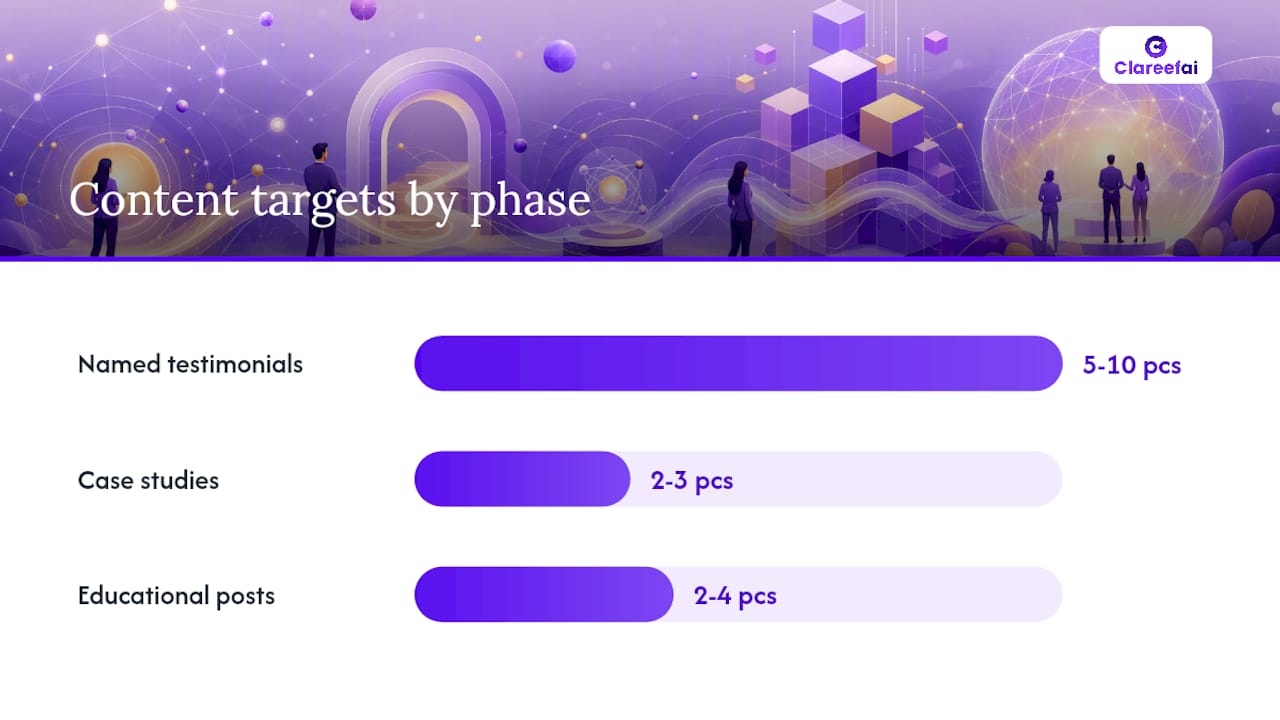
- Collect five to ten named testimonials with photos from existing customers.
60 days (credibility builders, medium effort):
- Publish two to three case studies with named clients and specific outcomes.
- Add a money-back or trial guarantee with clear terms.
- Run a UX audit (speed, mobile, headline clarity, form microcopy).
- Set up a review-request workflow triggered by positive customer interactions.
- Audit all CTAs for copy consistency across pages.
90 days (sustaining habits, higher effort):
- Establish a quarterly trust audit cadence with assigned owners.
- Build a testimonial governance process (collection, verification, consent, publication).
- Integrate trust metrics (review volume, bounce rate, conversion by source) into monthly reporting.
- Publish two to four educational blog posts or guides that demonstrate expertise.
- Assign a social media response SLA (target: reply to all comments and DMs within 24 hours).
Impact vs. effort at a glance:
| Action | Expected lift | Complexity |
|---|---|---|
| HTTPS + SSL | High (baseline requirement) | Low |
| Named testimonials with photos | High | Low-medium |
| Case studies with metrics | Very high | Medium |
| UX speed and mobile audit | Medium-high | Medium |
| Quarterly trust audit cadence | High (compounding) | Low |
| Educational content program | High (long-term) | High |
After each phase, measure the metrics tied to that phase’s actions: bounce rate and SSL status after day 30, review volume and conversion rate after day 60, and full trust audit scores after day 90.
9. Build a testimonial playbook from collection to publication
A step-by-step testimonial process balances authenticity, verification, and distribution. Ad hoc collection produces inconsistent results; a governed workflow produces assets you can use across every channel.
Collection:
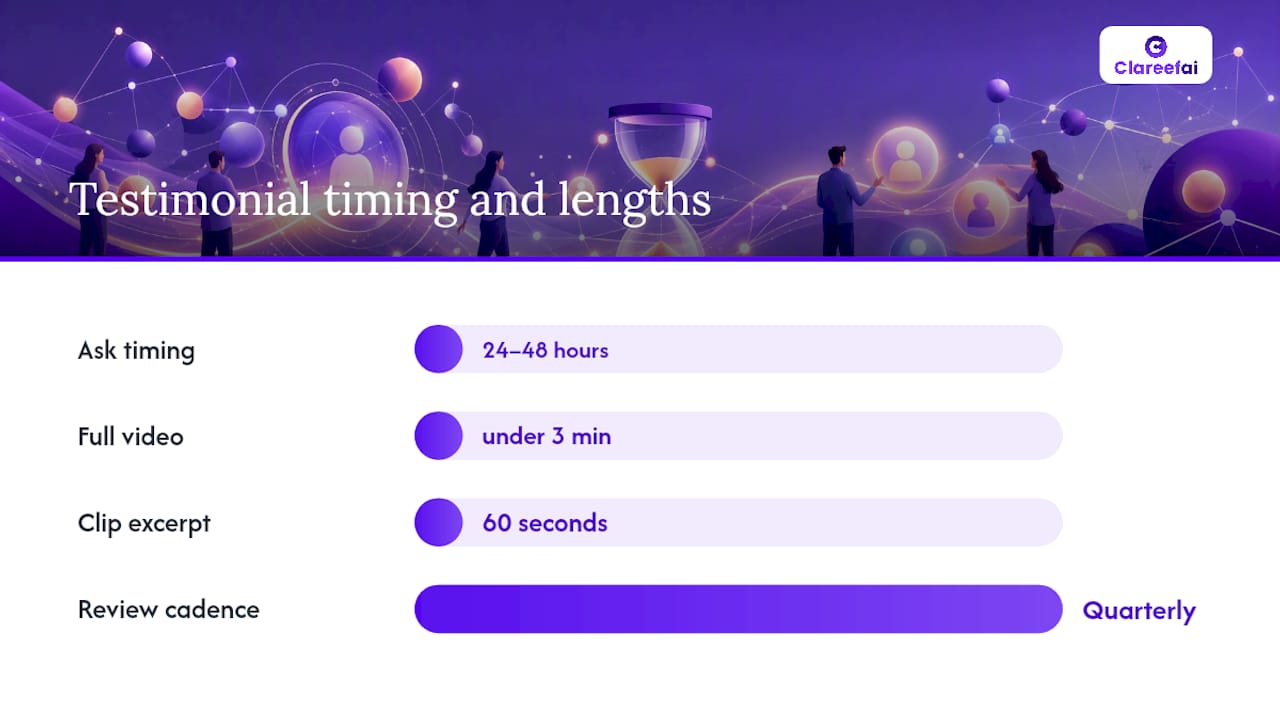
- Identify the right moment: 24–48 hours after a successful outcome (onboarding, renewal, resolved issue).
- Use a specific prompt, not a generic one. “What problem were you trying to solve, and what changed after you started using [product]?” produces more useful responses than “Tell us what you think.”
- For video testimonials, send a simple three-question script and a Loom or Zoom recording link. Keep it under three minutes.
Verification checklist:
- Confirm the reviewer’s identity via a verified email address or LinkedIn profile.
- Match the testimonial to a real transaction or contract record in your CRM.
- For U.S. businesses, obtain written consent before publishing any testimonial, including the right to use the person’s name, photo, and company.
- Label verified testimonials as such on your website (“Verified customer, [Company], [Date]”).
Consent template elements (U.S.):
- Full name and company of the reviewer.
- Explicit permission to publish on website, ads, and sales materials.
- Right to edit for length and clarity (with approval).
- Option to withdraw consent at any time.
Converting testimonials into multiple assets:
- Pull a one-sentence quote for a social media graphic.
- Use the full testimonial on the relevant product page.
- Build a one-page case study PDF for sales outreach.
- Clip a 60-second video excerpt for a landing page hero or LinkedIn ad.
Pro Tip: Customer testimonials are especially powerful for SaaS brands when they address a specific objection the buyer had before purchasing. Ask reviewers directly: “What almost stopped you from buying?” The answer often becomes your most persuasive proof point.
For ongoing governance, assign one owner (typically in Customer Success or Marketing) to review the testimonial library quarterly, retire outdated content, and flag gaps in coverage by product line or customer segment.
Key Takeaways
Building trust online requires combining baseline security, verified social proof, and consistent communication, then maintaining all three through a regular audit cadence.
| Point | Details |
|---|---|
| Security is the floor | HTTPS, a plain-language privacy policy, and visible contact info must be in place before any other trust signal matters. |
| Social proof quality beats quantity | Named testimonials with photos, specific outcomes, and minor imperfections outperform generic five-star ratings. |
| Sequence signals by visitor stage | Safety markers belong above the fold; case studies and certifications belong deeper in the funnel where buyers are evaluating. |
| Audits prevent trust decay | Broken links, outdated testimonials, and inconsistent copy erode credibility over time; a monthly audit cadence catches these before visitors do. |
| Clareefai centralizes testimonial management | For teams managing testimonials at scale, Clareefai automates collection, verification, and cross-channel publishing so proof stays current and credible. |
Trust is an operational habit, not a one-time project
The conventional wisdom treats trust as a setup task: install the SSL certificate, add some testimonials, publish a privacy policy, and move on. That framing misses the point entirely.
Trust is a capability, and capabilities are built through specific behaviors repeated consistently, not through a one-time configuration. A testimonial that was accurate in 2023 may misrepresent your current product. A privacy policy written before your last feature launch may no longer reflect what data you actually collect. A five-star rating average built over three years can collapse in 90 days if your response SLA slips.
The organizations that sustain trust online share one structural trait: they assign ownership. Someone on the marketing team owns review volume and response time. Someone in Customer Success owns the testimonial library. Legal owns the policy review calendar. Without named owners and a cadence, trust maintenance defaults to “everyone’s responsibility,” which means no one’s.
The B2B trust education guide from Clareefai is worth assigning to your sales and marketing leads as a starting framework for internal alignment. The goal is not perfection on day one. It is a predictable, improving system that your buyers can feel even when they cannot articulate why they feel it.
Clareefai helps you operationalize testimonial trust at scale
When your testimonial volume grows beyond what a spreadsheet can manage, or when compliance and multi-channel publishing become bottlenecks, a managed solution makes the difference between social proof that converts and social proof that collects dust.
Clareefai is built for B2B teams that need verified, current, and strategically placed testimonials across every channel where buyers evaluate you. The platform handles the parts of testimonial management that slow teams down:
- Automated collection triggered by CRM events, so no positive customer interaction goes uncaptured.
- Identity and transaction verification that labels each testimonial as confirmed, giving prospects confidence that the praise is real.
- Cross-channel publishing to your website, sales decks, review platforms, and LinkedIn, managed from one dashboard.
- AI-driven promoter identification that surfaces your most credible advocates for reference calls and case study development.
- Analytics showing which testimonials drive the most engagement and conversion by funnel stage.
For teams evaluating whether to build this process in-house or use a platform, the honest answer is that in-house works at low volume. At scale, the governance overhead, consent tracking, and multi-channel coordination make a purpose-built tool worth the investment. See how Clareefai drives sales growth with customer proof and explore a real use case showing measurable win-rate lift from unified testimonial management.
Useful sources and further reading
A short list of authoritative resources for teams that want to go deeper on specific trust-building topics:
- Building Trust Online: Website Credibility Signals — William Alexander’s breakdown of the cues visitors use to judge credibility, including subtle design signals most guides overlook.
- The Complete Guide to Building Trust on Your Website — Covers audit frameworks, first-impression research, and the compounding effect of small trust errors.
- The Online Trust Stack: 7 Signals That Make Strangers Trust You Fast — A practical sequencing framework for structuring trust signals across pages and channels.
- How to Build Trust With Potential Customers Online — Specific guidance on testimonial authenticity and why imperfect reviews outperform polished ones.
- How To Build Trust with Online Customers: Comprehensive Guide — Covers security expectations, data transparency, and UGC as trust drivers.
- How To Build Trust At Work: Strategies Experts Say Top Leaders Use — Forbes piece on the organizational behaviors that sustain trust, applicable to customer-facing teams.
- How to Build Trust in Workplace Relationships | HBS Online — Harvard Business School’s framework for trust as a developed capability, useful for leadership alignment.
- How to build trust online: proven strategies for business success — Operational examples from a growth-marketing perspective, with practical implementation notes.
- Building Trust with Reviews: A Practical Guide — Clareefai’s playbook for review workflows, timing, and verification for marketing and CX teams.
- Improving B2B Trust Process: A 2026 Guide for Sales Teams — Sales-focused recommendations for operationalizing trust signals in outreach and proposals.
Recommended
- How to Boost Sales Credibility: A Playbook for B2B Reps | Clareefai Blog
- Building Trust with Reviews: A Practical Guide for Marketing and CX Teams | Clareefai Blog
- Improving B2B Trust Process: A 2026 Guide for Sales Teams | Clareefai Blog
- Multi-Channel Social Proof: Maximizing B2B Trust | ClareefAI Blog
Share Article
Stay Updated
Get the latest insights on customer advocacy and SaaS growth delivered to your inbox.