Video Testimonial Scripts That Actually Convert Prospects
The best video testimonial scripts follow a three-act structure (problem, solution, result) and run 45 to 90 seconds for social, or 2 to 3 minutes for a website case study. If you need something right now, use this: “Before [product], I was stuck with [problem]. Now, [specific result] in [timeframe].” That two-line hook covers the entire arc and gives you a testimonial you can actually use.
Five formats do most of the heavy lifting across channels:
- Short social clip (45 to 60 seconds): one hook, one number, one face.
- 3-act interview (2 to 3 minutes): problem, decision, outcome, built for your homepage or a case study page.
- Results-first: opens with the win, then backfills how you got there. Strong for cold outreach.
- Day-in-the-life: shows the product in use rather than describing it. Works for complex B2B tools.
- Multi-person/panel: several stakeholders confirming the same outcome. Builds credibility with committee buyers.
Use the short version for LinkedIn, ads, and the first 10 seconds of any sales deck. Use the long version anywhere a prospect is actively evaluating you and wants proof, not just a taste.
Key Takeaways
Effective video testimonial scripts follow a three-act structure, run 45 to 90 seconds for social or 2 to 3 minutes for case studies, and rely on prompts rather than rigid scripts to preserve authenticity.
| Point | Details |
|---|---|
| Use the three-act structure | Build every script around problem, solution, and result to match how buyers actually evaluate proof. |
| Match runtime to placement | Keep social clips at 45 to 90 seconds and case study cuts at 2 to 3 minutes. |
| Prompt, don’t script | Send question outlines instead of word-for-word scripts to keep answers sounding genuine on camera. |
| Ask within the 3 to 7 day window | Request testimonials shortly after a measurable win, while details and enthusiasm are still fresh. |
| Extract multiple assets per session | One interview can yield a full case study plus several short social and sales clips. |
| Verify before you publish | Clareefai adds identity verification and distribution tracking once testimonial volume outgrows manual capture. |
Table of Contents
- What Makes Video Testimonial Script Templates Actually Work
- Which Script Format Fits Your Channel and Goal?
- How Do You Interview Customers Without Making It Feel Staged?
- Turning One Interview Into a Full Content Library
- When Should You Ask for a Testimonial?
- Script Excerpts You Can Adapt Right Now
- What ClareefAi Sees After Reviewing Hundreds of Testimonial Requests
- Scale Verified Testimonials Without Adding Headcount
- Sources
What Makes Video Testimonial Script Templates Actually Work
A three-act interview framework built around problem, solution, and result reliably produces testimonials that map to how buyers actually make decisions. Skip any one of those three beats and the testimonial reads as vague praise instead of proof.
The core elements every script needs
- Hook (0 to 10 seconds): a name, a role, and a stakes-setting line. “I’m Sarah, VP of Sales at a 200-person SaaS company, and we were losing deals to a competitor with weaker product but better proof.”
- Context/problem (10 to 25 seconds): the specific pain, not a generic complaint. Vague (“things were hard”) kills credibility; specific (“we had 40 testimonials in a spreadsheet nobody trusted”) builds it.
- Decision moment (25 to 35 seconds): why this solution, over alternatives, at that moment. This is the beat most scripts skip and most viewers actually want.
- Solution experience (35 to 60 seconds): what using it was like day to day. Onboarding friction, standout feature, a surprise.
- Specific outcomes/proof (60 to 80 seconds): a number, a percentage, a before/after. This is the section that gets clipped for social.
- Recommendation/CTA (80 to 90 seconds): who this is for and why they’d recommend it.
For a 60 to 90 second social or landing-page cut, compress steps 2 through 4 into a single 20 second block and let the outcome carry the weight. For a 2 to 3 minute case study version, let each beat breathe, and add a second outcome or a quote about team-wide adoption.
The instinct to hand a customer a script and ask them to read it word for word usually backfires. Video testimonials outperform text specifically because they carry visible authenticity and narrative specificity that a scripted read destroys the moment it sounds rehearsed. Prompt the beats, don’t script the words.
Pro Tip: Send customers the six element headers as bullet points, not full sentences, a day before recording. They’ll internalize the shape without memorizing lines, which keeps the delivery loose and the content still on target.
Which Script Format Fits Your Channel and Goal?
Different placements need different shapes. A LinkedIn post has three seconds to earn attention; a case study page has a reader who already wants proof. Match the format to where it will live.
Problem-solution. Use this for homepage hero sections and sales decks. Template: “We were dealing with [specific problem] for [timeframe]. It was costing us [cost, time, or opportunity]. After switching to [product], we [specific change], and now [result].” Prompt for specificity with: “What percent of your time did that eat up before?” and “What did the old process cost you monthly?”
Interview Q&A. Best for a dedicated testimonials page or a longer case study. Skip a rigid script; use a five-question pack instead:
- What was going on before you found us?
- What almost stopped you from trying us?
- What surprised you after you started?
- What’s different now, in numbers if you have them?
- Who else should be using this, and why?
Results-first. Lead with the number, then explain how you got there. Ideal for cold email and paid social where attention spans are short. Template: “[Specific result] in [timeframe]. Here’s what changed.” This format depends entirely on having a real number, so prompt hard for one: “Compared to the quarter before, what moved?”
Day-in-the-life. Shows the product inside a real workflow instead of describing it in the abstract. Works well for tools with a visual interface, and pairs naturally with screen capture. Template: “Here’s what my Tuesday morning looks like now that [product] handles [task].”

Multi-person/panel. Two or three voices confirming the same outcome from different angles (a VP and a frontline rep, for instance) is unusually persuasive for committee-based B2B deals, largely because of the “mirror effect”: a prospect sees someone in their own role validating the decision, and that identification does more convincing than any single glowing quote.
Short-form/social. 15 to 30 seconds, one hook, one outcome, captions on by default. Template: “[Result] in [timeframe]. That’s what [product] did for us.”
Reliable specificity prompts, regardless of format: “By what percent did that change?” “Compared to what period?” “What would have happened if you hadn’t switched?” “How long did that take to show up?” Vague answers come from vague questions; the fix is almost always a sharper follow-up, not a different customer.
For channel placement: LinkedIn wants the short-form or results-first cut under 60 seconds. Your homepage wants the full problem-solution or interview arc at 2 to 3 minutes. Email outreach wants a 30 to 45 second results-first clip embedded as a thumbnail, since almost nobody presses play on a cold email without a strong preview.
How Do You Interview Customers Without Making It Feel Staged?
Send three things before the camera rolls: a one-page brief explaining the format you’re using, four or five sample questions (not a script), and a release form for signature. Customers who see the questions in advance give sharper, calmer answers. Customers who see a full script tend to read it flatly on camera, which is the opposite of what you want.
- Warm up for five minutes before recording. Ask about their weekend, their team, anything unrelated to the product. This isn’t small talk for its own sake, it’s what gets the stiffness out of their shoulders before you hit record.
- Open with an easy question on camera. “Tell me your name and what you do” is a better opener than “Tell me about your ROI.” Build up to the harder, more specific asks.
- Use micro-prompts to extract numbers without pressure. If someone says “it saved us a lot of time,” don’t demand a metric outright. Ask “was that closer to a few hours a week or a full day?” People will round to something specific once you give them a frame to round toward.
- Let silence sit. The best quotes often come four seconds after you think the answer is finished. Don’t rush to the next question.
- Check gear before the warm-up, not during it. Phone camera at eye level, an external mic (even a $20 lavalier beats a built-in phone mic), and a light source in front of the subject rather than behind them. Bad audio kills more testimonials than bad lighting ever does.
Guiding customers with open prompts and letting them talk in their own words, rather than handing them a script to read, is what keeps a testimonial sounding like a person and not an ad.
Pro Tip: If a subject gives you a great line but flubs a word, don’t ask them to “do that again.” Ask a slightly different version of the same question. You’ll get a fresher, less self-conscious answer than a retake ever produces.
Turning One Interview Into a Full Content Library
A single well-run session can produce a full case study video plus a handful of short clips for social and sales outreach, which is where the real return on filming time shows up. Treat the recording as a raw material pull, not a single finished asset.
Edit the main cut in a fixed order: open on the strongest quote (usually the result, not the intro), build the before/after in the middle, and close on the recommendation. That structure holds attention better than chronological order, since leading with a quantifiable result is what actually stops a scroll.
- Scan the transcript for any sentence with a number, a comparison, or a strong emotional beat. Those are your clip candidates.
- Cut 15 to 30 second clips for social, 45 to 60 second clips for sales email attachments, and keep the full 2 to 3 minute version for the case study page.
- Add captions to every version. Most social viewers watch muted, and captions also help with accessibility and search indexing.
- Overlay the company logo and a one-line result stat in the first three seconds of every short clip, since that’s the window before someone decides to keep watching or scroll past.
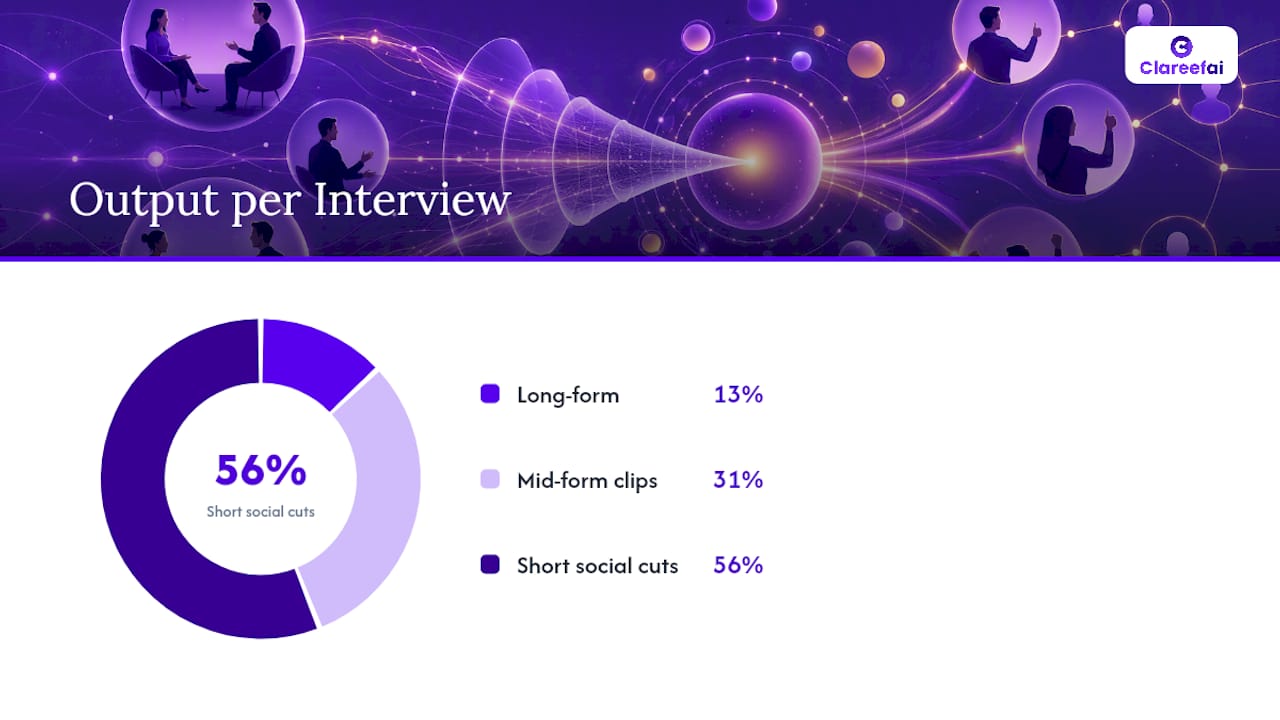
One interview, done right, should yield one long-form asset, two or three mid-form sales clips, and four or five short social cuts, all from a single recording block.
When Should You Ask for a Testimonial?
Timing matters more than most teams realize. The strongest window to ask is typically 3 to 7 days after a customer hits a clear win or milestone, when the details and the enthusiasm are both still fresh. Wait a month and the specifics blur into “yeah, it’s been good.”
Before you ever hit record, work through this checklist:
- Confirm the win is real and recent. A renewal, a measurable metric improvement, or a completed onboarding milestone all qualify. A vague “they seem happy” doesn’t.
- Send the release form first. Get written consent for recording, usage rights, and distribution channels before you schedule the call, not after.
- Flag sensitive metrics in advance. Ask whether specific revenue or headcount figures are shareable publicly or need to stay directional (“a significant increase” instead of an exact percentage).
- Confirm repurposing rights explicitly. A customer who agrees to “a testimonial” hasn’t necessarily agreed to a 15 second clip running as a paid ad; spell out where the footage might appear.
- Assign one internal owner. Someone needs to chase the signed release, the calendar invite, and the final approval, or the whole thing stalls in inboxes.
A repeatable step-by-step capture workflow removes most of the friction that causes teams to let good testimonial opportunities slip past the window entirely.
Script Excerpts You Can Adapt Right Now
Short social (18 seconds): “We cut onboarding time from three weeks to four days. That’s the whole reason I’m on this call.” Works because it leads with a number and skips all preamble.
Results-first (cold email clip): “Before, we had zero visibility into which reps were closing with social proof. Now every deal room has verified reviews attached automatically.” Works because it names the before-state precisely instead of vaguely.
2-minute case study close: “If you’re a sales team drowning in generic reviews nobody trusts, this is what actually fixes it.” Works because it mirrors the viewer’s own role and problem back to them, the same identification effect that makes panel testimonials land.
- Redact exact revenue figures if the customer requested it; use ranges or percentage change instead of raw dollar amounts.
- Blur or crop any visible customer data on shared screens before publishing.
- Track view completion rate, click-through from the CTA, and sales-cited usage (how often reps actually send the clip) after you publish, since those three numbers tell you which format is actually earning its production time.
What ClareefAi Sees After Reviewing Hundreds of Testimonial Requests
Structured prompts consistently beat rigid scripts, but the harder problem for most teams isn’t writing the questions. It’s proving the answers are real. A verified name, title, and company attached to a testimonial changes how a prospect reads every claim in it. Our verification workflow exists because unverified praise, however well scripted, still reads as marketing copy to a skeptical buyer. If you’re capturing one or two testimonials a quarter, a spreadsheet and a phone camera will get you there. Once you’re running this across multiple sales teams or client segments, the verification and distribution layer stops being optional.
— ClareefAi
Scale Verified Testimonials Without Adding Headcount
Once you’re collecting more than a handful of testimonials a month, a spreadsheet and a shared drive stop working. Clareefai gives sales and marketing teams a single system to request, verify, and publish video testimonials without a producer coordinating every step by hand.
The platform handles the parts that eat the most time in a DIY workflow:
- Automated capture requests sent at the right moment after a win, so timing doesn’t depend on someone remembering.
- Identity verification on every testimonial, so prospects see a real name and title attached, not an anonymous quote.
- Cross-channel distribution that pushes approved clips to your homepage, CRM, and sales enablement tools automatically.
- Analytics dashboards that show which testimonials are actually influencing deals, not just which ones look good.
DIY scripting and filming works fine at small volume. Once you’re managing testimonials across multiple product lines, regions, or sales teams, the manual version breaks down fast, and that’s exactly the gap the Clareefai platform is built to close. See how it plays out in practice on the win rate use case, then start a free trial to run your next testimonial request through it directly.
Sources
- Top 5 Reasons Why Testimonial Videos Are So Powerful for B2B Marketing | VID
- Video Testimonial Script: Templates and Examples That Get Real Results | LevitateMedia
- Video vs text testimonial: What converts visitors faster? | WiserReview
Recommended
Share Article
Stay Updated
Get the latest insights on customer advocacy and SaaS growth delivered to your inbox.