The Testimonial Management Guide for Marketers and Sales Teams
A testimonial management guide shows you which proof to collect, when to ask, how to verify consent, and where to publish so testimonials actually move prospects toward a decision. Treat it as an operations discipline, not a one-off content task, and you will build a reusable library that shortens sales cycles and lifts conversions at every funnel stage.
Your 48-hour quick start:
- Capture one high-signal quote from a customer who hit a measurable result this quarter. Record their name, title, company, date, and written consent before you publish anything.
- Add five metadata tags to that quote: persona, use case, objection it addresses, result metric, and consent status. Store it in a shared folder your sales team can access today.
If your team is collecting more than 20 testimonials per month or managing proof across multiple channels, skip ahead to the platform decision section for criteria on when software pays for itself.
Key Takeaways
A testimonial management guide works when you treat proof collection as a repeatable system, not a one-time content project.
| Point | Details |
|---|---|
| Timing drives quality | Ask at post-success milestones, renewal, or after support resolution for the highest-signal responses. |
| Four elements make proof persuasive | Every effective testimonial needs context, challenge, action, and a measurable result. |
| Consent is non-negotiable | Document written consent, scope, and identity verification before publishing any testimonial. |
| Metadata enables reuse | Tag by persona, objection, result metric, and consent status so any team member finds the right quote fast. |
| Clareefai scales the system | Clareefai automates capture, tracks permissions, and surfaces analytics so proof libraries grow without manual overhead. |
Table of Contents
- What is a testimonial management guide, and why does it matter?
- Why testimonials drive conversion: the evidence
- What makes a testimonial actually effective?
- When and how to ask for testimonials
- Question sets, templates, and video scripts you can use today
- How to collect testimonials responsibly: consent, verification, and legal compliance
- When does your team need a testimonial management system?
- How to store, tag, and organize testimonials for fast retrieval
- Where and how to deploy testimonials across the funnel
- How to measure testimonial impact and prove ROI
- Timeline and budget: what a testimonial program actually costs
- Common mistakes that undermine your testimonial program
- Treating testimonials as an operations discipline
- When a testimonial platform is the right next step
- Sources
What is a testimonial management guide, and why does it matter?
A client testimonial is a first-person statement from a real customer describing a specific experience with your product or service. That definition sounds simple, but testimonials are routinely confused with three adjacent content types:
- Reviews are unsolicited, platform-hosted ratings (Google, G2, Capterra). You do not control the prompt or the format. Ratings provide aggregate scores without narrative, signaling general satisfaction rather than specific experiences.
- Case studies are brand-authored narratives built around customer data. They are longer, require more production, and carry your editorial voice alongside the customer’s.
Testimonials sit between reviews and case studies: you prompt them, the customer authors them, and you publish them with attribution. That combination of authenticity and intentionality is what makes them effective at the decision stage.
Format matrix: which type works where
| Format | Strengths | Best funnel stage | Accessibility note |
|---|---|---|---|
| Short text quote | Fast to produce, easy to embed anywhere | Awareness, pricing pages | No extra work needed |
| Image + quote | Higher visual credibility, shareable | Social, landing pages | Add alt text to the image |
| Long-form case study | Handles complex objections, SEO value | Consideration, proposals | Use heading structure for screen readers |
| Video testimonial (30–90 sec) | Highest emotional impact, builds trust fast | Decision, homepage hero | Captions and transcript required |
| Audio clip | Podcast-friendly, low production cost | Nurture sequences | Transcript required |
Video testimonials carry the highest perceived authenticity in B2B contexts. If you are not yet producing them, the advantages of video testimonials for B2B marketers are worth reviewing before you build your collection workflow. For any video or audio format, captions and downloadable transcripts are non-negotiable for accessibility and for reaching prospects who watch content on mute.
Why testimonials drive conversion: the evidence
Buyers do not trust what you say about yourself nearly as much as they trust what your customers say. That asymmetry is the entire business case for investing in testimonial operations.
Research from the Medill Spiegel Research Center confirms that online reviews and testimonials measurably influence purchase decisions and can produce a direct sales lift by reducing perceived risk at the moment of decision. The mechanism is straightforward: a specific, attributed customer statement answers the objection a prospect has not yet voiced. High-signal testimonials reduce friction at exactly the moment buyers are most likely to stall.
Social proof matched to audience objections can increase engagement significantly. When proof is segmented by persona and use case rather than displayed generically, it reaches buyers at the right moment with the right message.
Targeted social proof strategies, when matched to specific buyer objections, can boost engagement and visibility far beyond what generic praise achieves. Two patterns consistently produce measurable outcomes:
- A B2B SaaS company that added a metric-backed video testimonial to its pricing page saw a meaningful lift in demo requests, because the quote directly addressed the “is this worth the price?” objection.
- A professional services firm that inserted role-specific quotes into its sales proposals shortened its average close cycle, because prospects saw peers in their exact role validating the decision.
Both outcomes depend on specificity and placement, not on volume. Fifty vague quotes do less work than five precise ones placed at the right decision point.
What makes a testimonial actually effective?
Most testimonials fail not because customers are unwilling to help, but because the collection process never asks for the right details. Effective testimonials share four structural elements.

Context tells the reader who the customer is and what situation they were in before engaging you. Without it, the quote floats in a vacuum and readers cannot self-identify.
Challenge names the specific problem. “We were losing deals at the proposal stage” is more persuasive than “we had some issues.”
Action describes what the customer did with your product or service. This is where specificity about features or processes builds credibility.
Result is the payoff, and it should be measurable whenever possible.
That quote works because it names a before state, a specific behavior change, and a measurable outcome. Compare it to this low-signal version: “Great product, highly recommend.” The second quote is useless in a proposal or on a pricing page because it gives a prospect nothing to hold onto.
Minimum metadata to record at collection time:
- Full name and job title
- Company name and industry
- Date of collection
- Written or recorded consent (with scope: where it can be published)
- Result metric mentioned
- Objection the quote addresses
Pro Tip: Ask customers to fill in a simple sentence frame: “Before [your product], we struggled with [X]. After [specific action], we achieved [measurable result].” This structure produces usable quotes in a single pass without a follow-up editing round.
For a deeper look at what separates high-signal from low-signal testimonials, the testimonial curation guide for marketers covers quality gates worth building into your review process.
When and how to ask for testimonials
Timing is the single biggest lever in testimonial collection. Ask too early and the customer has nothing concrete to say. Ask too late and the enthusiasm has faded. Three moments consistently produce the highest-quality responses:
- Post-success milestone. When a customer hits a result they cared about (a goal met, a project launched, a metric crossed), their motivation to share is at its peak. This is the moment to ask.
- At renewal or expansion. A customer who just renewed or upgraded has already made a positive judgment. The ask feels natural and the response tends to be specific.
- After a support resolution. A customer whose problem was solved quickly often feels more loyal than one who never had an issue. A well-timed ask here captures that goodwill before it fades.
Channels and when to prefer each
- Email works best for text and case-study requests. It gives the customer time to think and write.
- In-app prompts work for SaaS products where you can trigger the ask immediately after a key action (a first export, a milestone dashboard view).
- SMS or messaging apps work for short video requests when your customer relationship is informal enough to support it.
- Video capture links (tools like Loom-style async video prompts) reduce production friction for video testimonials dramatically.
A low-friction follow-up sequence that works: send the initial ask within 24 hours of the success moment, follow up once at day 5 if no response, and close the loop at day 10 with a brief note that makes it easy to say yes or no. Three touches is the ceiling. More than that damages the relationship.
On incentives: offering a gift card or discount in exchange for a testimonial creates a material connection that must be disclosed under FTC guidelines. If you use incentives, disclose them clearly in the published testimonial. Many teams find that a personal ask from a customer success manager outperforms any incentive, because the relationship is the motivator.
For a detailed checklist of moment-based asks and microcopy recommendations, the testimonial collection checklist for marketers covers the full outreach workflow.
Question sets, templates, and video scripts you can use today
The questions you ask determine the quality of the testimonial you receive. Generic prompts produce generic answers. Specific, staged questions produce specific, usable quotes.
Question sets by collection moment
Early-success (first 30–60 days):
- What problem were you trying to solve when you chose us?
- What surprised you most in the first few weeks?
- What would you tell a colleague who is evaluating us right now?
Post-implementation:
- What specific result have you seen since going live?
- Which part of the process made the biggest difference for your team?
- How has your workflow changed day-to-day?
Support satisfaction:
- How did our team handle your issue?
- What did the resolution mean for your business?
- Would you recommend us based on this experience? Why?
Renewal or expansion:
- What made you decide to renew or expand?
- What would have to change for you to consider leaving?
- What would you say to a peer who is on the fence about committing long-term?
Video script templates
30-second clip (self-recorded):
- Introduce yourself: name, title, company (5 seconds).
- Name the problem you had before (10 seconds).
- Describe the result you got (10 seconds).
- Give your one-line recommendation (5 seconds).
60-second interview-style:
- Interviewer asks: “Tell us about your situation before you started.”
- Interviewer asks: “What changed after you implemented the solution?”
- Interviewer asks: “What would you say to someone considering this?”
Keep the interview questions visible to the customer on screen or in a pre-call brief. Customers who know the questions in advance give more confident, specific answers.
Form template and microcopy tips
- Use a progress bar if your form has more than three fields. It reduces abandonment.
- Label the result field: “What specific outcome or metric can you share?” Not just “Results.”
- Add a character minimum (100 characters) to the main text field to discourage one-liners.
- Include a consent checkbox with plain-language copy: “I agree that [Company] may publish this testimonial on its website, marketing materials, and social channels.”
How to collect testimonials responsibly: consent, verification, and legal compliance
Collecting a testimonial without a documented consent record is a liability, not just a process gap. The FTC’s endorsement and testimonial guides require that any material connection between an endorser and a brand be clearly disclosed. If you paid for the testimonial, offered a discount, or have a business relationship that could influence the endorsement, that connection must appear in the published content.
15 U.S.C. § 45 gives the FTC authority to pursue unfair or deceptive acts in commerce. A fabricated testimonial, a real testimonial published without consent, or a paid endorsement presented as organic all fall within the scope of deceptive practices this statute covers. The 16 C.F.R. part 255 regulations provide the specific disclosure language and examples that interpret these requirements in practice.
Consent and release workflow
- Collect consent at the point of submission, not after. A checkbox in the collection form is the minimum. A signed release is better for video.
- Record the scope of consent: website only, all marketing materials, paid ads, or unlimited. Scope matters when you repurpose content.
- Store the consent record alongside the testimonial asset, not in a separate system. You need to be able to produce it on request.
- Set a review date. Consent given two years ago may need to be refreshed, especially if the customer’s role or company has changed.
Verification steps
- Confirm the submitter’s identity against your CRM or customer database before publishing.
- Cross-reference the company name and role with LinkedIn or your account records.
- Never publish a testimonial from an unverified source, even if the content sounds authentic.
| Compliance checkpoint | What to capture | Where to store |
|---|---|---|
| Written consent | Name, scope, date, channel permissions | Testimonial record in CRM or platform |
| Material connection disclosure | Incentive type and value, if any | Published testimonial and internal record |
| Identity verification | CRM match, role confirmation | Internal record only |
| Review date | Next consent refresh date | Testimonial metadata |
Disclosure is not optional. The FTC has pursued enforcement actions against brands that presented paid or incentivized endorsements as organic customer opinions. One sentence of disclosure protects both your brand and the customer.
For a deeper look at consent recording and secure storage practices, the secure testimonial management guide covers GDPR considerations alongside U.S. compliance requirements.
When does your team need a testimonial management system?
Manual management works when you are collecting fewer than 10 testimonials per month and publishing them in one or two places. Past that threshold, the cracks show fast: quotes get lost in email threads, consent records live in spreadsheets no one updates, and sales reps reuse the same three quotes because they cannot find anything better.
Treating testimonials as a system with defined stages (collect, classify, curate, deploy, review) is what separates teams that scale their proof library from teams that stall at 20 quotes and never grow past them.
Decision criteria for adopting a platform
- Volume: More than 20 new testimonials per month makes manual tagging and storage unsustainable.
- Multi-channel publishing: If testimonials need to appear on your website, in your CRM, in proposals, and on review sites simultaneously, a platform with integrations is faster and more reliable than manual copy-paste.
- Governance: Multiple team members contributing to the library need role-based access and approval workflows.
- Analytics: If you cannot currently measure which testimonials are being used and which are driving conversions, you are flying blind on ROI.
- Compliance: Consent records stored in a dedicated system are easier to audit than a shared Google Sheet.
Feature checklist for evaluating platforms
- Automated capture workflows (email, in-app, SMS)
- Metadata and tagging at the point of collection
- Consent and permission record storage
- CMS and CRM integration (Salesforce, HubSpot, or your stack)
- Publishing widgets for website and landing pages
- Analytics dashboard showing usage and conversion data
- Role-based access for marketing, sales, and customer success
Decision tree: manual to platform
- Under 10 testimonials/month, one channel: Manage manually with a shared spreadsheet and a folder in Google Drive or SharePoint.
- 10–20 testimonials/month, two or three channels: Use a semi-automated approach: a collection form (Typeform or a native CRM form), a shared Notion or Airtable database, and a manual publishing step.
- More than 20 testimonials/month, multiple channels, compliance requirements: A dedicated platform is the right call. The time saved on tagging, consent tracking, and publishing alone typically justifies the subscription cost within the first quarter.
The step-by-step testimonial workflow guide walks through the operational setup for each stage of this progression.
How to store, tag, and organize testimonials for fast retrieval
A testimonial library that no one can search is a library no one uses. The goal of your metadata schema is simple: any team member should be able to find the right quote for the right prospect in under 60 seconds.
Recommended metadata fields
- Persona: The buyer role this testimonial speaks to (VP of Sales, Marketing Director, IT Manager).
- Use case: The specific problem or workflow the testimonial addresses.
- Objection addressed: The sales objection this quote neutralizes (price, implementation complexity, reliability, support quality).
- Result metric: The specific outcome mentioned (percentage, time saved, revenue impact).
- Media type: Text, image+quote, video, audio, case study.
- Consent status: Approved, pending refresh, expired.
- Publish locations: Where the asset has been used (homepage, pricing page, proposal template, LinkedIn).
- Last reviewed date: When the testimonial was last checked for accuracy and consent validity.
Tagging best practices
Keep your taxonomy flat. A tagging system with 50 categories becomes unusable within six months. Start with five to eight tags per testimonial maximum, drawn from the fields above. Review and prune the taxonomy quarterly.
Pro Tip: Create a “Sales Favorites” tag that your sales team controls. Let reps flag the five quotes they reach for most often. That tag becomes your highest-priority content for video upgrades and case study expansion.
Integration notes
Your testimonial library should connect to at least three systems:
- CRM (Salesforce, HubSpot): so sales reps can pull proof directly from the deal record without leaving their workflow.
- CMS (WordPress, Webflow, or your web platform): so marketing can publish and update testimonials without a developer.
- Proposal tool (Proposify, PandaDoc, or similar): so account executives can insert the right quote at the right proposal section automatically.
Where and how to deploy testimonials across the funnel
Placement determines whether a testimonial moves a prospect or just decorates a page. The rule is simple: match the proof type to the objection the buyer has at that funnel stage.
Placement rules by funnel stage
- Awareness (top of funnel): Short, punchy quotes on social media and blog posts. The goal is credibility, not detail. One sentence with a name and company is enough.
- Consideration (middle of funnel): Role-specific quotes on product pages and comparison pages. Video testimonials work especially well here because they answer “does this work for someone like me?”
- Decision (bottom of funnel): Metric-backed quotes on pricing pages, in proposals, and in sales outreach. Case studies belong here too, because buyers at this stage want proof of ROI, not just satisfaction.
Repurposing playbook
- Take a long-form case study and extract three to five short quotes for social media use.
- Pull the result metric from a video testimonial and use it as a stat callout on your pricing page.
- Insert a role-specific quote into your sales email sequence at the “objection handling” step.
- Add a testimonial block to your proposal template at the section where pricing is introduced.
- Use a customer quote as the headline of a landing page A/B test to measure its conversion impact directly.
Testimonials also carry SEO value when published as structured content with schema markup. A case study page with proper attribution and schema can rank for long-tail queries that include your customer’s industry or use case. For a broader look at how social proof fits into content marketing programs, examples of content marketing that boost brand visibility illustrates how proof assets integrate with organic traffic strategies.
The guide to building trust with reviews covers cross-channel proof deployment in more detail, including placement sequencing for B2B sales cycles.
How to measure testimonial impact and prove ROI
You cannot improve what you do not measure. Most teams track testimonial volume but not testimonial performance. These are the KPIs that actually tell you whether your proof library is working.
Suggested KPIs
- Conversion rate lift at CTAs: Compare conversion rates on pages with testimonials versus pages without. Run this as a controlled A/B test on one high-intent page first.
- Click-through on social proof modules: If your website platform supports it, track clicks on testimonial carousels or proof blocks to see which quotes generate the most engagement.
- Dwell time on pages with testimonials: Longer dwell time on a pricing or product page suggests the testimonial content is holding attention.
- Reference-to-demo conversion rate: Track how often a prospect who was connected to a customer reference (a live call or a written testimonial) converts to a demo or trial.
- Proposal close rate by testimonial type: Compare close rates on proposals that include metric-backed quotes versus those with generic praise.
A/B test template
| Test variable | Control | Variant | Success metric |
|---|---|---|---|
| Placement | No testimonial on pricing page | One video testimonial above the CTA | Demo request rate |
| Format | Text quote | Same quote with headshot and company logo | Time on page, CTA clicks |
| Specificity | Generic praise quote | Metric-backed quote (same customer) | Conversion rate |
| Position | Testimonial below the fold | Testimonial in the hero section | Scroll depth, bounce rate |
Run each test for at least two weeks and on pages with enough traffic to reach statistical significance before drawing conclusions. The Clareefai solutions page for management shows how analytics dashboards can surface these metrics without manual tracking.
Timeline and budget: what a testimonial program actually costs
Building a testimonial program from scratch takes longer than most teams expect, and scaling it costs more than a spreadsheet and good intentions.
30-day rollout plan
- Week 1: Define your collection moments, draft your question sets, and set up a consent-capture form.
- Week 2: Send your first 10 collection requests to high-satisfaction customers. Aim for a mix of text and video.
- Week 3: Tag and store responses. Build your metadata schema. Publish two to three testimonials on your highest-traffic pages.
- Week 4: Review what you collected, identify gaps by persona and objection, and plan your next collection round.
90-day scaling plan
- Month 2: Integrate your testimonial library with your CRM and proposal tool. Train sales reps on how to search and use the library.
- Month 3: Run your first A/B test on a high-intent page. Measure conversion lift. Identify your top five performing testimonials and prioritize them for video upgrades.
Cost bands
- Staff time: The biggest cost driver in most programs. Expect 4–8 hours per week for a part-time testimonial coordinator at the build stage.
- Video production: Self-recorded async video (using a capture link) costs almost nothing. Professionally produced video testimonials typically run from a few hundred to several thousand dollars per clip, depending on production quality and location.
- Platform subscription: Dedicated testimonial management platforms vary in price based on features and team size. The cost becomes justified when manual management is consuming more staff time than the subscription would replace.
The hidden cost of not having a system is staff time. When sales reps spend 20 minutes searching for the right quote before a proposal, that time adds up across a team of 10 reps sending 50 proposals per month.
Common mistakes that undermine your testimonial program
Most testimonial programs do not fail dramatically. They erode quietly, through small errors that compound over time.
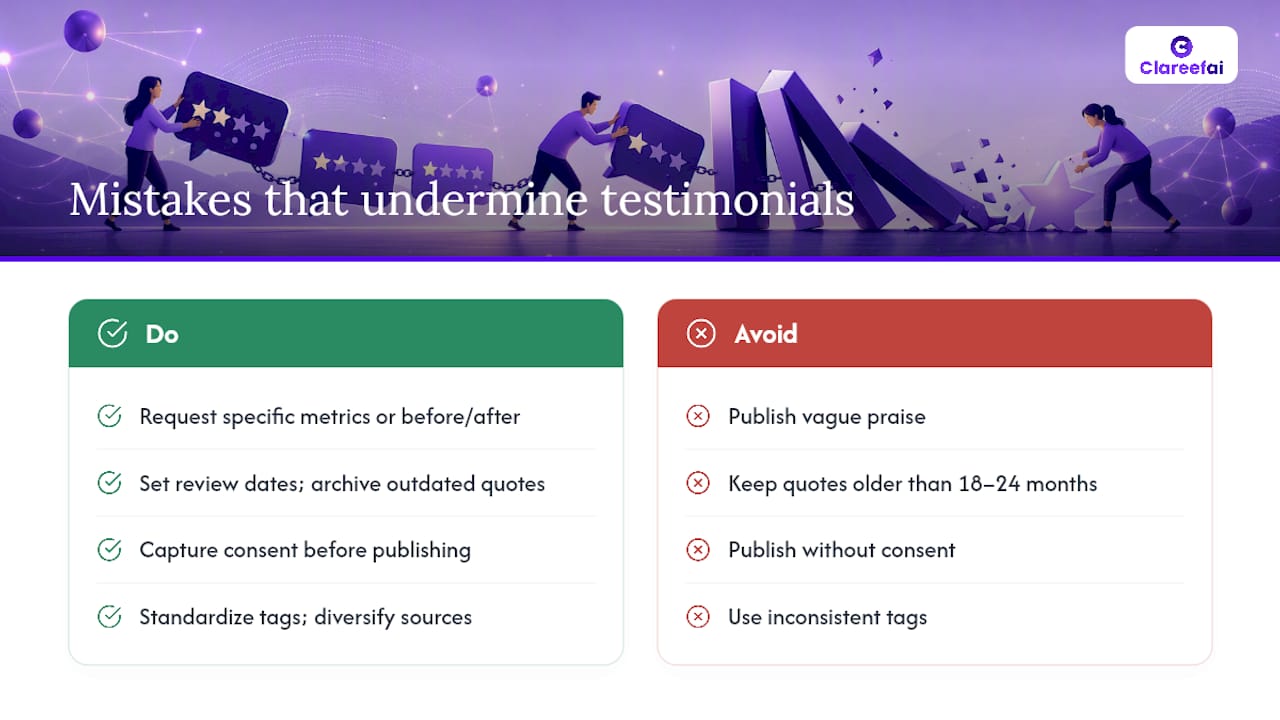
Vague praise with no specifics. “Amazing company, great support” tells a prospect nothing. Fix it by sending a follow-up email with one specific question: “Can you share a number or a before/after that captures the impact?”
Stale quotes. A testimonial from a customer who left two years ago, or one that references a product version you no longer sell, actively hurts credibility. Set a review date for every testimonial and archive anything older than 18–24 months unless it is still accurate.
Missing consent records. Publishing a testimonial without documented consent exposes you to legal risk and, if the customer objects, reputational damage. Consent records belong in your system from day one.
Inconsistent tagging. A library where some testimonials are tagged “pricing objection” and others are tagged “cost concern” and others have no tag at all is effectively unsearchable. Standardize your taxonomy before you scale.
Over-reliance on one or two customers. If the same three names appear across your website, proposals, and social media, prospects notice. Diversify your library by persona, industry, company size, and use case.
Publishing without attribution. Anonymous testimonials carry almost no persuasive weight. Always include at minimum a first name, title, and company.
A 15-minute audit you can run right now
Pull your 10 most-used testimonials and check each one against this list:
- Does it include a specific result or metric?
- Is the customer’s name, title, and company visible?
- Is there a consent record on file?
- Was it collected within the last 18 months?
- Does it address a real objection your prospects raise?
Any testimonial that fails two or more of these checks should be retired or upgraded before it does more harm than good.
Treating testimonials as an operations discipline
At Clareefai, the perspective we hold is that most marketing teams underinvest in testimonial operations not because they do not value social proof, but because they treat it as a content task rather than a system. Content tasks get done once. Systems compound.
The teams that get the most value from their testimonial libraries are the ones that have defined collection triggers, documented consent workflows, a searchable metadata schema, and a regular review cycle. They treat their proof library the way a good sales team treats its CRM: as a living asset that needs maintenance, not a static archive.
The evidence-operations model (collect, classify, curate, deploy, review) is the framework we recommend because it creates repeatable value at every stage. It also makes compliance manageable, because consent and verification are built into the workflow rather than bolted on after the fact.
Clareefai’s platform is built around this model. Its AI-driven promoter identification surfaces your highest-impact advocates automatically, and its permission tracking ensures every published testimonial has a documented consent record. For teams managing proof across sales, marketing, and customer success simultaneously, that kind of operational infrastructure is what separates a library that gets used from one that gets ignored.
When a testimonial platform is the right next step
If your team is collecting more than 20 testimonials per month, publishing across three or more channels, and still managing everything in a spreadsheet, the cost of that approach is already higher than a platform subscription.
Clareefai is built for exactly this inflection point. Its capture workflows automate collection across email, in-app, and video channels. Its permission tracking stores consent records alongside every asset. Its CRM and CMS integrations mean sales reps can pull the right proof from inside Salesforce or HubSpot without leaving their workflow. And its analytics dashboard shows you which testimonials are driving conversions, not just which ones exist.
The win-rate improvement use case shows how unified testimonial management translates into measurable sales outcomes. If you are ready to see how it works for your team, you can explore Clareefai’s marketer solutions or request a demo to walk through the platform with your specific use case in mind.
Sources
The sources below back the legal, research, and operational claims in this guide.
- FTC — Guides Concerning the Use of Endorsements and Testimonials in Advertising (final guides)
- 15 U.S.C. § 45 — Unfair or deceptive acts or practices — Cornell Law School
- 16 C.F.R. part 255 — Endorsements and testimonials — eCFR
- How online reviews influence sales — Medill Spiegel
- Customer Testimonial Systems in 2026: How to Turn Feedback Into Real Conversion Value — Unicorn Platform
Recommended
Share Article
Stay Updated
Get the latest insights on customer advocacy and SaaS growth delivered to your inbox.