Scale Social Proof: Testimonial Request Email Templates for Marketers
Send a short email within a week of a clear win, anchor it to that specific result, and give the client either 2-3 easy prompts or a drafted testimonial to approve. Keep it under 100 words. That single move, timing plus specificity plus a low-effort ask, is what separates a testimonial request that gets ignored from one that gets a reply by lunchtime.
TL;DR:
- Sending testimonial requests within one week of a clear win significantly boosts response rates by capturing client enthusiasm early.
- Asking clients who have already given unprompted praise or named specific measurable results increases the likelihood of receiving a positive response.
- Keeping the email under 100 words, opening with the result, and providing three guiding prompts simplifies the process and encourages replies.
- Following up after five to seven days with a friendly reminder can double response rates without risking annoyance.
- Using an automated, repeatable testimonial workflow ensures consistency, authenticity, and easier management across multiple client relationships.
Table of Contents
- How Do You Write a Testimonial Request Email?
- Email Best Practices: What to Include and What to Avoid
- Ready-to-Use Email Templates You Can Copy Today
- Subject Lines and Preview Text That Get Opened
- Following Up Without Being Annoying
- Where to Collect and Showcase the Testimonials You Get
- Why Testimonial Requests Deserve a Real Workflow, Not a One-Off Email
- Turn One-Off Email Requests Into a Repeatable Testimonial Engine
- Sources
How Do You Write a Testimonial Request Email?
Timing decides more of your response rate than wording does. A testimonial request email sent within 7 days of a clear win, a renewal, a strong support ticket resolution, a milestone hit, outperforms emails sent weeks later, because the client’s enthusiasm is still fresh and the details are still top of mind. Wait a month and you’re asking someone to reconstruct a memory instead of describe a feeling.
Who you ask matters just as much as when. Prioritize clients who:
- Already praised you unprompted, in a call, a Slack message, a support ticket, an NPS comment
- Hit a measurable result you can name specifically (cut onboarding time by 40%, closed a deal faster, resolved a recurring issue)
- Have a working relationship with someone on your team who can send the request personally, not from a shared inbox
Email is the right default channel for almost every B2B ask. It gives the client time to think instead of putting them on the spot, which is exactly why email outperforms phone or in-person requests for most companies. Save LinkedIn for cases where the relationship is public-facing and the client would want the recommendation visible on their own profile. Save phone or video calls for warm relationships where you’re recording a video testimonial anyway.
Email Best Practices: What to Include and What to Avoid
A testimonial request email works when it respects the client’s time and removes every decision point you can. That means:
- Stay under 100 words. Long emails read like a task; short ones read like a favor. Ask for one thing: a 2-3 sentence reflection on the result you’re referencing.
- Open with the result, not a greeting. “Your onboarding time dropped from three weeks to four days” beats “Hope you’re doing well” every time, because it proves you’re paying attention rather than running a template.
- Give 3 guiding prompts. A blank “would you write us a testimonial?” request is the single biggest reason these emails get ignored. Guiding questions turn a vague task into an easy one, and they also shape the kind of quote you get back.
- Offer to draft it yourself. Tell the client you’ll write something based on their answers and send it back for approval. This one line often triples your reply rate, because it shifts the effort from them to you.
- Ask permission explicitly. State clearly that you’d like to use their words publicly, on your website, in a case study, in sales materials, and give them a chance to redact names, figures, or anything sensitive before you publish anything.
Pro Tip: Frame the request as a 1:1 conversation, not a broadcast ask. Treating it as a genuine exchange rather than a mass request noticeably increases how often people actually respond.
Skip the generic “would you mind leaving us a review?” line entirely. It sounds automated because, functionally, it usually is.
Ready-to-Use Email Templates You Can Copy Today
Different relationships call for different tones. Here are four templates built around the scenarios you’ll hit most often.
Short professional (for executives or formal accounts):
Subject: Quick favor, [Client Name]?
Hi [Name], congrats again on hitting [specific result]. Would you be open to sharing a 2-3 sentence reflection on working with us? A few prompts if helpful: What problem were you solving? What changed? Would you recommend us, and why? Happy to draft something from your notes if that’s easier.
Casual (for existing, friendly relationships):
Subject: Loved seeing [result], got a minute?
Hey [Name], that [result] you hit last week made my day. Mind if I ask a small favor? A couple lines on what working together has been like would help us out a ton. No pressure on polish, I can clean it up if you send rough thoughts.
Edit-and-approve (for busy contacts):
Subject: 30 seconds for a testimonial?
Hi [Name], quick ask: could you send 2-3 bullet points about your experience with [project/result]? I’ll turn them into a short testimonial and send it back for your approval before we use it anywhere.
Incentive (transparent and simple):
Subject: A small thank-you for your feedback
Hi [Name], we’re collecting testimonials from clients like you, and as a thank-you, everyone who shares one gets [specific, modest reward, gift card, discount, donation]. Takes about two minutes, just a couple sentences on your experience.
Swap in real names and real results every time. A template with placeholders left visible reads as exactly what it is.
Subject Lines and Preview Text That Get Opened
The subject line decides whether your testimonial request email gets opened at all, and personalized, specific subjects consistently beat generic ones. “Leave us a review” sounds transactional and gets ignored. “Quick favor, Sarah?” or “Loved seeing that 40% improvement” sounds like it’s actually from a person.
A few rules that hold up across most inboxes:
- Include the client’s first name or the specific project, not your company name
- Reference the result or milestone directly in the subject when you can
- Keep preview text consistent with the subject; don’t let it read like a newsletter teaser
- Avoid words like “review,” “survey,” or “feedback request,” they trigger the same mental filter as a marketing email
Following Up Without Being Annoying
Most people don’t ignore testimonial requests on purpose. They mean to reply and then the email slides down the inbox. One well-timed reminder fixes that.
- Wait 5 to 7 days, then send a short, friendly nudge. A single reminder at that interval often doubles your response rate without feeling pushy.
- Stop after that unless the client replies asking for more time. A second or third follow-up starts to feel like pressure, and pressure kills goodwill faster than silence does.
- When they reply with rough notes or bullets, draft a polished 2-3 sentence testimonial yourself and send it back for approval rather than asking them to write the final version.
- Always confirm publish consent again at this stage, and offer to anonymize their name, company, or any specific numbers if they’d rather keep it vague.
Pro Tip: Keep the follow-up shorter than the original ask. “Just circling back on this, totally fine if now isn’t a good time!” does more work than a longer, more formal reminder.
Where to Collect and Showcase the Testimonials You Get
Once a client responds, give them more than one way to finish the job. Some will reply directly in the email thread; others respond faster to a short form link (a couple of fields, nothing longer), and a smaller group will happily record a 30 second video clip if you ask.
- Verify who actually sent the testimonial and get their explicit okay to publish it before it goes anywhere public
- Format it for the web with a pull quote, a name and title line, and one sentence of result context so it doesn’t read as generic praise
- Place it on landing pages, in case studies, inside sales decks, and on LinkedIn, wherever a prospect is deciding whether to trust you
Written testimonials work well on a website; a short video clip tends to carry more weight in a sales enablement deck or a demo call, where seeing a real person say the words lands harder than reading them.
Why Testimonial Requests Deserve a Real Workflow, Not a One-Off Email
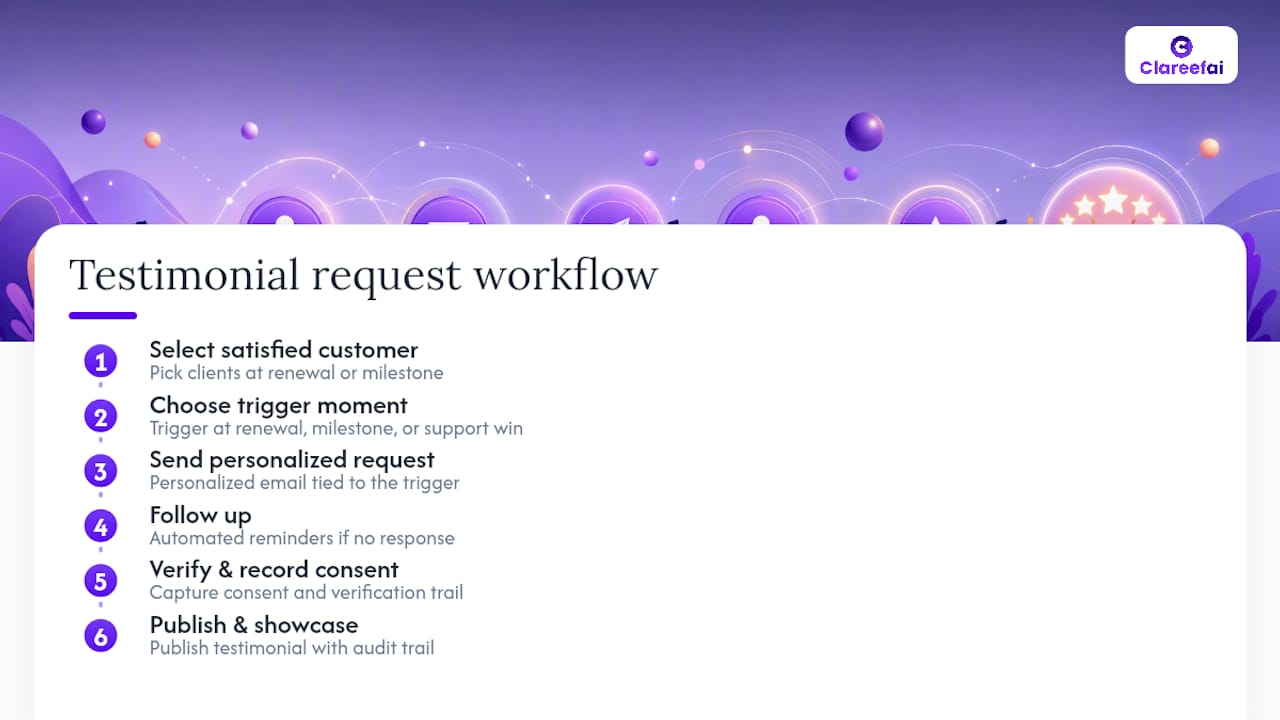
Most companies treat testimonial requests like a chore they remember every few months. That’s backwards. A testimonial request email works best as a trigger, tied to a renewal, a milestone, a support win, not a random Tuesday task on someone’s to-do list.
Building that into a repeatable workflow does two things a one-off ask can’t: it keeps your ask timing consistent even when your team is busy, and it gives you a verification trail so every published quote can be traced back to a real, consenting client. That audit trail matters more than most teams realize once a prospect starts asking “is this testimonial actually real?”
— ClareefAi
Turn One-Off Email Requests Into a Repeatable Testimonial Engine
A single well-written email gets you one testimonial. This platform is built for the moment you need multiple verified, formatted, and published testimonials without rewriting the same request by hand every week. The platform automates the collection workflow itself: it triggers requests at timely moments, verifies respondent identities, and syncs approved testimonials across websites, case studies, and sales materials in real time.
Marketing and sales teams that need social proof at scale, not just a handful of quotes on a testimonials page, get the most out of this. Instead of tracking approvals in a spreadsheet, you get a dashboard showing exactly who’s been asked, who’s responded, and where each testimonial is currently live. If you’re managing more than a handful of client relationships, start with Clareefai’s solutions for marketing teams and see what a verified, always-on testimonial pipeline looks like next to the templates you’re sending today.
Sources
- 12 questions that lead to high-quality testimonials | Forbes Agency Council
- How to ask a customer for a testimonial (and get a yes) | Reachlabs
Recommended
Share Article
Stay Updated
Get the latest insights on customer advocacy and SaaS growth delivered to your inbox.