Pin One Testimonial: LinkedIn Social Proof That Converts for B2B
LinkedIn social proof is verified, outcome-focused evidence from real customers or peers that signals you’re worth trusting before a prospect ever messages you. If you do one thing this week, pin a single quantified customer testimonial to your Featured section. Studies show that quantified evidence in the right spot outperforms a wall of vague endorsements every time.
TL;DR:
- Detailed recommendations that mention specific projects and measurable results hold the most trust, especially when they include the person’s name, role, and company.
- Posting recent, quantified proof in the Featured section every 90 days maximizes visibility and engagement from serious prospects.
- Collect testimonials within 48 hours of a milestone or positive mention, personalizing the ask and offering a draft to speed up the process.
- Prioritize quality over volume by focusing on three to five detailed, quantified testimonials that stay current and relevant.
- Incorporate social proof into multiple profile areas, including About, Experience, and company pages, with the Featured section as the highest leverage space.
Table of Contents
- What Social Proof On LinkedIn Looks Like And Why It Matters For B2B
- Types And Platform Examples Of LinkedIn Social Proof
- How To Earn Social Proof On LinkedIn
- Where To Display Social Proof For Maximum Impact
- Measuring Social Proof: KPIs, Attribution, And Testing
- The Clareefai Workflow: Collect, Verify, Tag, Publish, Measure
- How To Request And Manage Recommendations Without Losing Authenticity
- Weaving Social Proof Into Messaging And Networking
- Mistakes That Quietly Undercut Your LinkedIn Credibility
- Prioritization And Common Traps For B2B Teams
- Try Clareefai’s Approach To Verified Testimonials
- Sources
What Social Proof On LinkedIn Looks Like And Why It Matters For B2B
Social proof works because humans borrow judgment from others when they’re uncertain, and B2B buyers are uncertain constantly. They’re spending someone else’s budget, defending the decision to a boss, and picking from a dozen vendors who all sound the same in a pitch deck. Three psychological triggers drive the effect: consensus (other smart people chose this), authority (a credible voice vouched for it), and the halo effect (one strong positive trait colors how a buyer reads everything else on your profile).
LinkedIn concentrates all three triggers in one place, which is why the importance of LinkedIn social proof for B2B sits above almost any other channel. A buyer researching your solution is likely already on the platform, checking your profile before a call, and forming a trust judgment in seconds.
LinkedIn gives you several native signals to work with:
- Written recommendations from clients, colleagues, or managers
- Skill endorsements from your network
- Featured section items like case studies or video
- Reactions and comments on posts
- Lead Gen Forms social proof, which displays a message showing how many people have already submitted the form, a small nudge that can lift completion rates
Each one carries different weight, and knowing which to prioritize is where most marketers waste effort.
Types And Platform Examples Of LinkedIn Social Proof
Not all social proof on LinkedIn earns its keep equally. Written recommendations sit at the top of the trust hierarchy because they’re specific, attributed, and hard to fake. A recommendation that names a project, a result, and a working relationship reads as evidence. A generic “great to work with” reads as a favor returned.
Skill endorsements matter less than most profiles suggest. They’re easy to click and easy to ignore, and LinkedIn’s own endorsement schema documentation confirms this data is loosely verified and constrained by API access, which is exactly why a stack of one word endorsements never closes a deal the way one detailed recommendation does.
Here’s where the real variety lives:
- Featured section assets: case studies, client logos, embedded video testimonials, press mentions
- Post-level proof: a client quote with a specific metric, a short video clip of a customer describing a result, before-and-after screenshots
- Company page assets: employee advocacy posts, customer logos, aggregated review counts
- Lead Gen Forms social proof: the automatic message showing prior submissions, which functions as passive validation for cold prospects
- Comment threads: a client publicly agreeing with your post carries more weight than a like, because comments and shares with context carry far more algorithmic and human trust value than reactions
If you’re building a testimonial library, pairing short video clips with written quotes gives you flexibility across every one of these placements without collecting the same story twice.
How To Earn Social Proof On LinkedIn
Most marketers ask for a recommendation months after a project ends, when the client’s memory of specifics has faded into “yeah, it was good.” That’s the wrong window. Ask within 48 hours of a visible win, a renewal, a positive QBR, or a public mention, while the result is fresh and the client is still feeling good about it.
Here’s the operational sequence that actually produces usable proof instead of vague praise:
- Identify the moment. Watch for a completed milestone, a renewed contract, or an unprompted compliment in an email or call.
- Target the right person. Go to whoever felt the result directly, not just the executive sponsor. A user who saw their workload drop writes a better testimonial than a VP who approved the budget.
- Personalize the ask. Skip LinkedIn’s default recommendation prompt. Reference the specific project: “You mentioned the onboarding time dropped from three weeks to four days. Would you be open to putting that in a short recommendation?”
- Offer to draft it. Send a two-sentence starting point they can edit. Busy people abandon blank text boxes; they’ll happily fix a draft.
- Request the format, not just the favor. Ask for the specific result, their name, title, and company, so the recommendation reads as verifiable rather than generic.
- Collect media permission at the same time. If you want a quote for a post or a Featured case study, get that yes in the same message. Don’t make a second ask later.
The format checklist matters more than the ask itself. Practitioners consistently point to a Problem → Action → Result structure as the highest-converting shape for testimonials, paired with a real name, role, and company for verification. “Our onboarding was taking three weeks and losing deals to slower follow-up. We brought in [Client] to fix the intake process. Time to first response dropped to under four hours, and our close rate on inbound leads rose within the quarter” reads as evidence. “Great team, highly recommend” reads as filler.
Pro Tip: Batch your asks around a quarterly milestone, like a renewal cycle or a case study rollout. You’ll get three or four strong testimonials in one week instead of chasing one every month.
For a repeatable ask flow you can hand to your whole sales team, Clareefai’s testimonial collection checklist walks through the exact message templates and timing windows that produce the highest response rates.
Where To Display Social Proof For Maximum Impact
Placement decides whether a great testimonial ever gets seen. Practitioners describe the Featured section as a final gatekeeper: serious prospects check it right before deciding whether to message you, which makes it the highest-leverage real estate on your entire profile.
Beyond Featured, proof belongs in five other spots, each doing a different job:
- About section: one quantified result woven into your first two lines, since most readers never scroll past them
- Experience entries: a metric or client outcome attached to each relevant role
- Standalone posts: full client stories with a hook, a quote, and a number
- Company page: aggregated proof like logos and review counts for prospects researching the business rather than an individual
- Lead Gen Forms: the built-in submission-count message doing quiet work in the background of every campaign
For posts specifically, structure matters more than length. Open with a hook that states the problem in one line, follow with a direct client quote, land on a specific metric, then close with a soft call to action, like a question that invites a comment rather than a like. That structure also plays to how LinkedIn’s algorithm actually distributes content.
| Placement | Best content type | Refresh cadence |
|---|---|---|
| Featured section | Quantified testimonial or case study | Every 90 days |
| About section | One-line result summary | Every 6 months |
| Standalone posts | Client story with metric | Weekly to biweekly |
| Company page | Logos, aggregated reviews | Ongoing as collected |
| Lead Gen Forms | Automatic submission message | No action needed |
Rotating your Featured testimonial every 90 days keeps returning visitors seeing something fresh, and it matches the rotation cadence practitioners recommend for maintaining engagement lift over time.
Measuring Social Proof: KPIs, Attribution, And Testing
Track three numbers to know if your social proof is working: engagement rate on posts featuring client stories, profile views in the days after you refresh Featured, and leads that mention LinkedIn as the source. That last one only works if you’re capturing it, so tag campaign links with UTMs, log LinkedIn as a lead source field in your CRM, and add a simple “How did you hear about us?” field to intake forms.
Benchmarks give you a target to test against. Posts built around client success stories can reach engagement rates north of 5%, well above the platform average, while profiles with multiple detailed recommendations generally see higher view counts than profiles with few recommendations.
| Metric | What to track | Review cadence |
|---|---|---|
| Post engagement rate | Reactions, comments, shares on proof-led posts | Every 2 weeks |
| Profile views | Lift after Featured refresh | Every 2 weeks |
| Leads citing LinkedIn | CRM source field, UTM-tagged clicks | Monthly |
| Featured rotation impact | View trend before/after swap | Quarterly |
Run two-week checks on anything new you post, then do a full quarterly refresh of your Featured section and top testimonials. If a post gets comments instead of just likes, that’s your signal it’s working: LinkedIn’s own reaction data shows comments carry far more distribution weight than passive reactions, so write proof-led posts that end in a question, not a period.
The Clareefai Workflow: Collect, Verify, Tag, Publish, Measure
Some platforms build this entire loop into one system instead of leaving it scattered across inboxes and screenshots. They verify each customer’s identity before a testimonial goes live, which solves the “is this even real” doubt that undermines generic reviews.
The workflow runs in five steps:
- Collect testimonials and short video clips at natural touchpoints in the customer journey
- Verify the identity and role behind each piece of feedback
- Tag proof by use case, industry, or result type so the right story surfaces for the right prospect
- Publish automatically across LinkedIn posts, Featured, and your company page
- Measure which testimonials actually move prospects toward a decision
Pro Tip: A 30 to 90 second video paired with a metric-led post outperforms plain text almost every time. Pair that video with a Featured case study for prospects doing deeper research.
Teams using a structured system like this typically see faster prospect decisions and higher conversion rates, because the proof a buyer sees is already matched to their situation instead of generic.
How To Request And Manage Recommendations Without Losing Authenticity
The biggest authenticity risk in LinkedIn recommendations isn’t fraud, it’s laziness. A recommendation that says “amazing to work with, highly skilled” could describe anyone, and readers can tell. Managing this well starts with what you ask for, not just when.
Always request a recommendation tied to a specific project or result, never a general character reference. Give the person a light structure to follow, something like “what problem were we solving, what did we do, what changed.” You’re not scripting their words, you’re giving their memory a shape to fill in.
Track who you’ve asked and when, so you’re not requesting from the same three people while dozens of other happy clients go untapped. A simple spreadsheet or CRM tag works fine for small teams. Managing recommendation requests as a system, rather than a one-off favor, is what keeps your profile from having five recommendations from 2022 and nothing since.
Reciprocity helps too. If a client or colleague writes you a recommendation, write one back for them when it’s genuinely deserved, not as an automatic trade. That habit keeps your network engaged and keeps recommendations flowing without feeling transactional. Finally, revisit old recommendations occasionally. If a client’s role or company changed, ask if they’d update the piece to reflect current context, since a stale attribution (“Manager at [Company that no longer exists]”) quietly undercuts the credibility the recommendation was supposed to build.
Weaving Social Proof Into Messaging And Networking
Social proof shouldn’t live only on your profile. It belongs in the outbound messages and connection requests you send every week. A cold connection request that references a shared result, “Saw your post on onboarding, we helped a similar team cut theirs from three weeks to four days,” lands very differently than a blank “I’d like to add you to my network.”
In direct messages, drop a single specific proof point instead of a generic pitch. One line referencing a named result, without a link or attachment, reads as conversational rather than salesy. Save the full case study or testimonial link for after the prospect responds, not in the first message.
Networking comments work the same way. When you comment on a prospect’s post, referencing a relevant result you’ve delivered for a similar company adds credibility without turning the comment into an ad. This is also where building broader sales credibility pays off. Every touchpoint, comment, message, or InMail, either reinforces or quietly undermines the trust your profile is trying to establish.
Group discussions and industry hashtag threads are underused here too. Showing up consistently with useful commentary, occasionally backed by a client result, builds the kind of visible activity that signals credibility even to people who haven’t read your Featured section yet.
Mistakes That Quietly Undercut Your LinkedIn Credibility
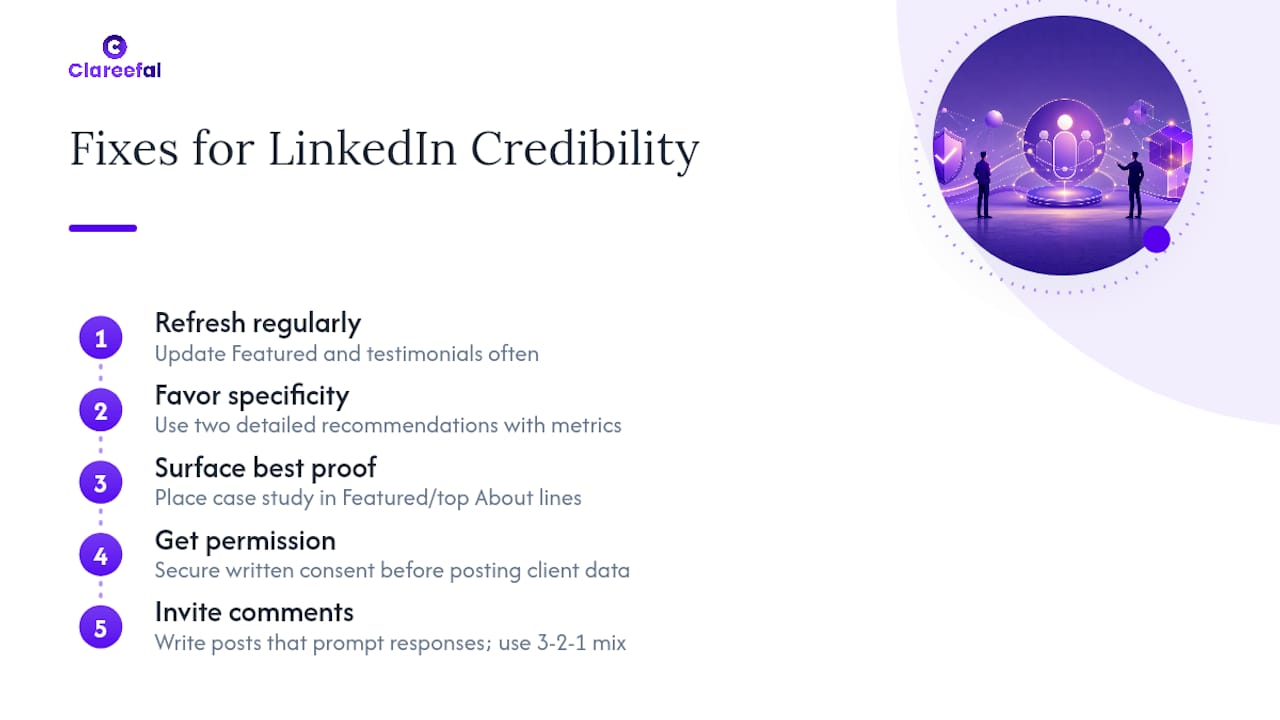
The most common mistake is collecting testimonials once and never touching them again. A Featured section from three years ago, with a client who’s since left the company, signals neglect rather than trust. Refresh cadence isn’t optional polish, it’s what keeps proof credible.
The second mistake is chasing volume over specificity. Ten generic endorsements do less work than two detailed recommendations with real numbers attached. A wall of one-word skill endorsements can actually read as padding once a buyer notices there’s nothing concrete behind it.
Third, marketers often bury their strongest proof. A powerful case study sitting in the middle of a long About section, three paragraphs down, might as well not exist. Buyers skim. Put your best evidence where the first five seconds of attention actually land: the top of Featured, the first two lines of About.
Fourth, teams forget permissions. Posting a client’s name, headshot, and specific metric without a clear yes creates real risk, and it’s an easy step to skip when you’re moving fast. Get the permission in writing at the same time you collect the story.
Finally, some marketers optimize for reactions instead of comments, chasing likes with generic “thoughts?” captions instead of designing posts that invite a real response. A content mix like the 3-2-1 rule, balancing industry commentary, original insight, and proof-led posts, keeps your feed from tipping entirely into self-promotion, which is its own credibility risk.
Prioritization And Common Traps For B2B Teams
Chase quality, not quantity. Three to five detailed, quantified testimonials will outperform twenty vague ones every time, and they’re far easier to keep current. The trap most teams fall into is collecting proof once during onboarding and letting it go stale for years, which quietly signals the opposite of what social proof is supposed to do.
Run a simple 90-day roadmap: audit what you have, collect two or three new pieces of proof tied to recent wins, publish them in the right placements, then measure what actually moves engagement or leads before you repeat the cycle.
— Clareefai
Try Clareefai’s Approach To Verified Testimonials
Some systems offer tools that turn the described workflow into an automated process. They collect testimonials, video clips, and reviews across customer touchpoints, verify the person behind each one, and organize everything by use case so the right proof surfaces for the right prospect.
Sales and marketing teams can use role-specific dashboards, so a rep chasing a renewal sees different proof than a marketer building a case study library, and CRM integrations keep testimonials tied to real accounts instead of sitting in a shared drive nobody checks. Teams often see faster prospect decisions once buyers can find quantified, verifiable proof in the moment they’re evaluating a deal, rather than digging through scattered LinkedIn posts.
If you’re managing win rates across a sales team, the Clareefai use case for testimonial management shows how a centralized system changes those numbers. Start with the Clareefai solutions overview to see how collection, verification, and publishing fit your current stack, and book a demo to walk through your own testimonial backlog with the team.
Sources
- Social proof for Lead Gen Forms | Marketing Solutions Help
- Ultimate Guide to Social Proof on LinkedIn | ContentIn
- LinkedIn Reactions: What They Signal About Your Content
- LinkedIn marketing practitioner guidance (Buffer)
Recommended
Share Article
Stay Updated
Get the latest insights on customer advocacy and SaaS growth delivered to your inbox.