From Days to Seconds: Build a Customer Reference Database
A customer reference database is a centralized, searchable system that stores your verified customer advocates, their success stories, and their consent status in one place. The core outcome: sales reps stop hunting through spreadsheets and Slack threads for “someone who looks like this prospect” and instead find the right match in seconds. That speed shows up directly in shorter sales cycles. Some platforms build this workflow around verification and CRM sync, so the database stays trustworthy as it scales.
TL;DR:
- A centralized, searchable customer reference database drastically reduces search time from days to seconds, enabling faster deal progression and higher win rates.
- Key features include advanced filtering, CRM integration, asset management, and verified consent, which ensure trustworthy and relevant advocate matching.
- Establishing clear ownership, regular data verification, and phased rollout are crucial to building a sustainable, scalable reference program.
- Training should focus on real-world search scenarios and clear intake procedures to ensure ongoing adoption and data reliability.
- Proper governance and role-based access protect sensitive customer data, prevent advocate burnout, and maintain compliance across teams.
Table of Contents
- Why a Customer Reference Database Matters for B2B Sales Enablement
- Core Features to Require in a Reference Database Platform
- How to Build and Maintain a Searchable Reference Database
- How to Measure Impact and ROI From a Reference Database
- Governance, Privacy, and Avoiding Common Pitfalls
- What Sales Teams Actually Do With the Database Day to Day
- Training Sales and Reference Teams to Use the System Well
- Timeline Considerations for Rolling Out and Scaling the Program
- Author Perspective: Balancing Automation With Authentic Advocate Relationships
- How Clareefai Helps: Solution Summary and Next Steps
- Sources
- FAQ
Why a Customer Reference Database Matters for B2B Sales Enablement
Scattered references cost you deals. When a rep needs a customer voice for a stalled opportunity, the usual process means emailing customer success, waiting for a reply, and hoping the “perfect fit” customer hasn’t already been asked five times this quarter. That delay often stalls momentum right when a prospect is deciding.
The numbers back this up. Without a centralized, searchable system, finding an appropriate customer advocate can take sales teams up to three days; a structured, CRM-integrated database cuts that search to seconds and lets reps match by industry, use case, and company size instantly. One documented enterprise case study found that building a searchable reference database tripled the number of usable references and cut search time from days to seconds, which translated directly into closed deals.
Statistic to remember: a three-day search delay versus a seconds-long lookup isn’t a minor efficiency gain. It’s the difference between a reference showing up while the prospect is still deciding and one arriving after they’ve already signed with a competitor.
Core Features to Require in a Reference Database Platform
Not every reference tool does the same job well. Before you sign a contract, run every vendor demo against this checklist.
- Search, filters, and tagging by industry, region, company size, use case, and product line, so reps aren’t scrolling a flat list.
- A structured data model with minimum fields per record: customer name, contact, industry, use case, consent status, last-used date, and asset type.
- CRM integration, ideally with Salesforce and Microsoft Dynamics, so reps see relevant references directly inside the opportunity record instead of switching tools.
- Advocate verification and consent capture, confirming identity and permission before any testimonial goes live.
- Asset management across text, video, and slide decks, with reuse automation so one testimonial can power a case study, a sales one-pager, and a website quote.
- Role-based access and audit trails, so customer success, marketing, and sales each see only what they need.
Pro Tip: During a demo, ask the vendor to search for a reference by a specific, narrow use case on the spot. If it takes more than a few clicks, that’s how your reps will experience it every day.
Vendors like Upland RO Innovation build their entire pitch around CRM integration as a baseline requirement, not an add-on. Treat it the same way.
How to Build and Maintain a Searchable Reference Database
Getting a reference database off the ground follows a fairly predictable pattern, whether you’re using a spreadsheet or a dedicated platform.
- Name a program owner and internal champion. Reference programs without a clear owner tend to decay within months because nobody’s accountable for keeping data fresh.
- Define your data model and intake sources. Pull candidates from onboarding surveys, NPS opt-ins, customer success check-ins, and marketing requests rather than relying on one team to generate everything.
- Verify, enrich, and link assets. Confirm each advocate’s identity and consent, then attach the right video, quote, or case study to their record.
- Set operational rules. Build in cooldown periods between requests, cap how many times any single customer gets used, and schedule re-verification every few months.
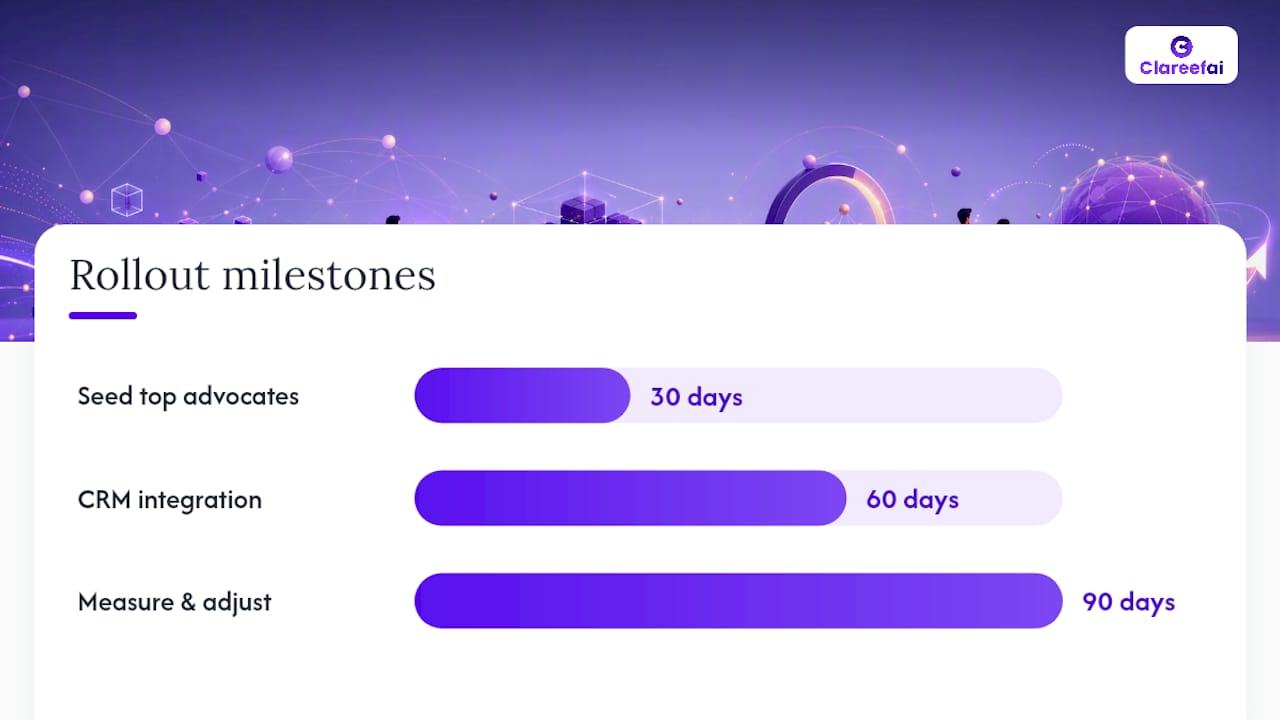
- Roll out in phases. In the first 30 days, seed the database with your top 15 to 20 advocates. By 60 days, integrate it with your CRM so reps see suggestions inside live opportunities. By 90 days, measure fulfillment rate and adjust intake sources based on gaps.
Pro Tip: Your best advocates burn out fastest. Rotate reference requests across a wider pool rather than defaulting to the same three loyal customers every time sales asks.
Naming an owner and internal champion isn’t optional bureaucracy. Program guidance from product management practitioners consistently points to ownership as the difference between a program that scales and one that quietly dies after the initial launch.
How to Measure Impact and ROI From a Reference Database
Four KPIs matter most: time-to-reference (how long it takes to source a match), reference fulfillment rate (percentage of requests successfully filled), reference-driven win rate uplift, and deal velocity on opportunities where a reference was used.
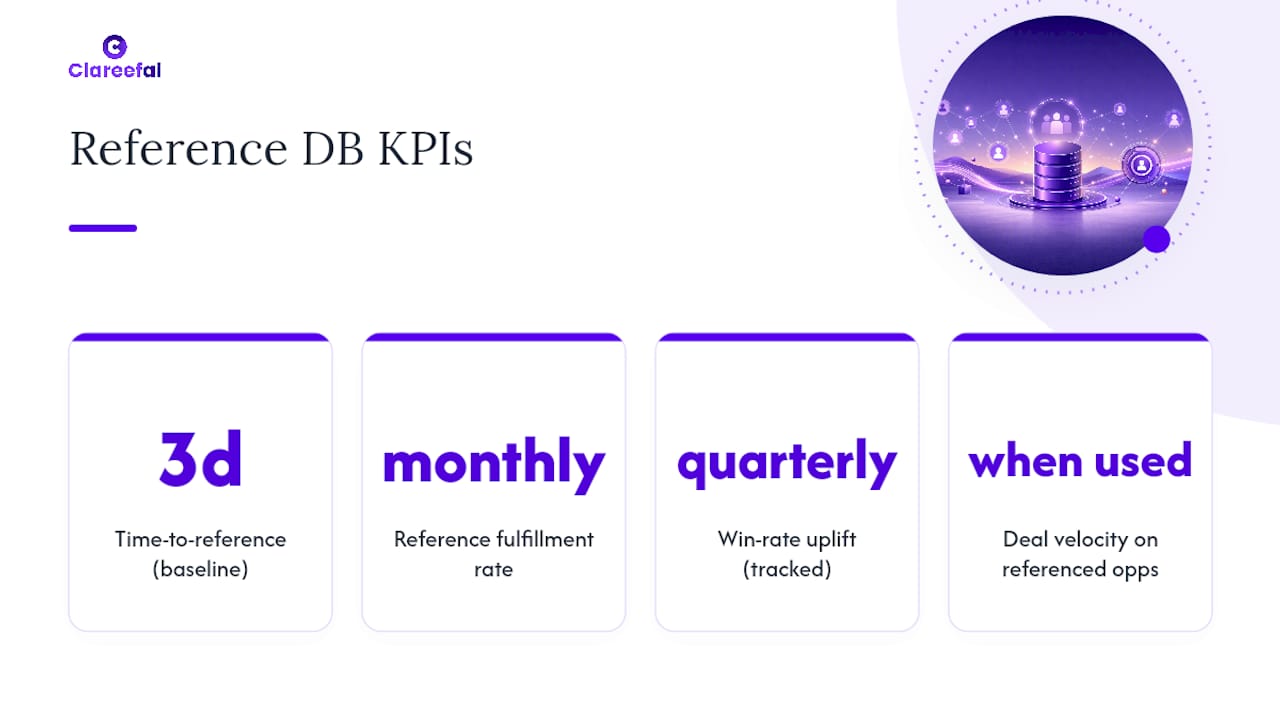
Baseline these numbers before rollout. If reps currently report taking up to three days to find a suitable reference, that’s your starting point, and cutting it to same-day or instant turnaround becomes your headline result. Track fulfillment rate monthly and win-rate uplift quarterly, since deal cycles need time to close before the data means anything.
Set realistic targets: aim for meaningful reductions in search time within the first quarter, and expect win-rate improvements to show up more gradually as reps build the habit of actually using the database instead of defaulting to old contacts.
Governance, Privacy, and Avoiding Common Pitfalls
A reference database handles sensitive customer data, so governance isn’t an afterthought.
- Store consent records separately for public references (usable in marketing materials) and private ones (reference calls only), and never blur that line.
- Apply role-based access so marketing can’t publish a reference that customer success flagged as call-only.
- Prevent burnout with frequency rules and clear opt-out paths, so advocates can pause participation without friction.
- Schedule retention reviews and re-verification every few months to confirm consent and contact details are still current.
Role-based entitlements and audit trails protect sensitive data while keeping the workflow fast enough that sales still wants to use it. A secure system that nobody touches because it’s slow defeats its own purpose.
What Sales Teams Actually Do With the Database Day to Day
Picture a rep three weeks into a mid-market deal. The prospect’s procurement team wants proof the product works at their scale, in their industry. Instead of pinging customer success and waiting, the rep opens the opportunity record in the CRM and sees three matched references surfaced automatically, filtered by industry and company size.
One is a video testimonial. One is a written case study with a specific metric. One is an advocate flagged as available for live reference calls. The rep exports the case study as a PDF in one click, attaches it to the follow-up email, and schedules a reference call with the third advocate for the following week, all without leaving the deal record.
Customer success sees a different workflow. During a quarterly check-in with a happy customer, they capture a fresh quote about a specific outcome and log it directly into the database with consent noted. That record becomes searchable the same day.
Marketing pulls from the same pool for a different reason. When building a case study for a upcoming campaign, they filter by industry and asset type, find three strong candidates, and reach out to schedule a video shoot, coordinating through the database so they don’t accidentally re-request someone customer success already tapped that month.
Each team touches the same records for different jobs. That shared visibility is what separates a working reference program from three departments unknowingly burning out the same five loyal customers. It also means sales enablement can finally answer the question every VP eventually asks: how many active, willing advocates do we actually have right now?
Training Sales and Reference Teams to Use the System Well
A reference database is only as good as the habits built around it. Rolling out new software without training almost guarantees reps fall back on their personal contact lists within a month.
Start training with real deal scenarios, not a generic platform walkthrough. Show reps how to search by the filters they’ll actually use: industry, deal size, and specific objection type. A rep who sees the tool solve their exact Tuesday-afternoon problem adopts it faster than one who watches a feature tour.
Give customer success and marketing teams separate, shorter sessions focused on intake. They need to know exactly which fields to fill in, how to capture consent correctly, and how to flag a reference as public versus private only. Sloppy intake is the single fastest way a database becomes unreliable, and unreliable databases get abandoned.
Assign a point person, often the same program owner from your rollout, to answer questions during the first 60 days and to review new records for completeness. Build a short internal cheat sheet covering search tips, request etiquette, and escalation paths for reference requests that need faster turnaround. Revisit training every quarter as new hires join sales, since a tool nobody explains to new reps quietly becomes shelfware within two quarters. Track adoption by monitoring how many reps search the database weekly, not just how many logged in once during onboarding.
Timeline Considerations for Rolling Out and Scaling the Program
Most B2B teams can get a working reference database live within a single quarter, though the pace depends heavily on how much cleanup existing customer data needs before it’s usable.
Weeks 1 through 4 typically cover setup: choosing the platform, defining your data model, and seeding the database with your strongest 15 to 20 advocates pulled from existing customer success relationships. Weeks 4 through 8 focus on integration, connecting the database to Salesforce or Microsoft Dynamics so reps see matches inside live opportunities rather than in a separate tool. By week 12, most teams have enough usage data to spot gaps, industries or use cases with too few references, and can target intake efforts there.
Scaling beyond the initial rollout looks different. Adding new intake sources, such as automated NPS-triggered requests or onboarding surveys, usually happens in the second quarter once the core workflow is proven. Expanding to multi-team usage, letting marketing and customer success pull from the same pool for different purposes, tends to follow once sales adoption is solid and governance rules are tested.
The biggest timeline risk isn’t technical setup. It’s underestimating how long consent verification and data cleanup take on your existing customer list. Budget extra time there rather than on the software configuration itself.
Author Perspective: Balancing Automation With Authentic Advocate Relationships
Automation should accelerate discovery, not replace the relationship work behind it. The mistake we see most often is teams treating a reference database as a set-and-forget tool instead of a living program that needs a steward checking in on advocate fatigue and data accuracy. Governance and enablement aren’t opposing goals. The programs that scale well protect their customers first, and speed follows naturally from that discipline.
— ClareefAi
How Clareefai Helps: Solution Summary and Next Steps
Certain platforms support the workflow this article describes: verified advocates, CRM sync, and asset management in one searchable hub instead of scattered folders and spreadsheets. AI-driven matching can identify your strongest promoters automatically, while dashboards for sales, marketing, and customer success help teams work from shared verified data without overlapping requests.
Sales enablement teams and customer marketers see the fastest wins, since reference requests that once took days now surface in seconds through integrated CRM workflows. If you’re managing advocacy across a growing customer base, the Solutions overview shows how verification, video testimonials, and analytics fit together. Marketing teams specifically can see how content reuse works on the for marketers page. Ready to see pricing? Compare the Basic, Professional, and Enterprise plans, or start with the free plan to test the workflow before committing.
Sources
Yes. Dedicated reference management platforms like Clareefai sit alongside or integrate directly with your main CRM, adding verification, matching, and asset management features that a general CRM doesn’t include out of the box.
- Upland RO Innovation reviews | G2
- How a high-tech company created a searchable customer reference database that tripled references and closed sales | MarketingProfs
- Seven ways to acquire and retain customer references | Pragmatic Institute
FAQ
What Is a CRM Database Example?
A CRM database example is a system like Salesforce or Microsoft Dynamics that stores customer contact details, deal history, and interaction logs. A customer reference database extends this by adding verified testimonials, consent status, and use-case tags tied to specific advocates.
Can You Give Me an Example of a Customer Database?
A customer database typically includes contact information, purchase history, and support tickets. A customer reference database is a specialized version focused on advocacy: it tracks which customers have agreed to be references, their industry and use case, and which assets (video, quotes, case studies) are tied to their record.
Is a CRM Just a Database?
No. A CRM tracks sales and relationship activity across the customer lifecycle, while a database is the underlying structure storing that data. A customer reference database is purpose-built for one job: helping sales find and use the right verified advocate quickly, often working in tandem with the CRM rather than replacing it.
Recommended
Share Article
Stay Updated
Get the latest insights on customer advocacy and SaaS growth delivered to your inbox.